


%20Link%20Building.svg)
%203rd-Party%20Listicles.svg)
%20Reddit.svg)
%20Youtube.svg)








Website Migration SEO Checklist: Pre, During & Post-Launch


- A successful website migration SEO project starts long before launch day, with planning, URL mapping, and technical validation as its cornerstones.
- Site migrations today affect more than Google rankings. If your redirects, structured data, internal links, or crawlability break, you can also lose visibility in Google AI Overviews, ChatGPT, Perplexity, and other AI search experiences until those systems rebuild confidence in your new URLs.
- Split your migration into three phases: Prepare, Protect, and Prove. Benchmark everything before launch, protect rankings during deployment, then monitor closely for the first 90 days while Google and AI search systems process the changes.
- Migrations can often take longer to recover from than most teams expect. A Search Engine Journal study found that it took an average of 523 days for the new domain to reach the same estimated organic traffic as the old one.
What Counts as a Website Migration
A website migration is any significant change to your website that affects how users, search engines, or AI crawlers access, understand, or retrieve your content. Some migrations are relatively low risk. Others can temporarily disrupt rankings, traffic, demo requests, and AI visibility if you don’t plan them carefully.
For SaaS teams, a migration can look like:
- Domain change: Moving from oldbrand.com to newbrand.com after a rebrand or acquisition
- CMS or platform change: WordPress to Webflow, Contentful to headless, HubSpot to Framer
- HTTP to HTTPS: Securing your website by moving every page to HTTPS
- Structural / URL change: Changing URL patterns, information architecture, navigation, or folder structure.
- Hosting change: Moving to a different hosting provider, CDN, or server environment while keeping URLs largely unchanged
- Redesign: Rebuilding templates, layouts, or page structures that may also affect internal linking, metadata, and crawlability
- Hybrid: Combining multiple changes at once, such as a redesign, CMS migration, domain change, and URL restructure. These carry the highest SEO risk and need the most rigorous planning
Whether you're migrating 100 pages or 100,000, the objective stays the same: help Google, AI search engines, and your users understand that your content has simply moved, and not disappeared.
Migration Complexity Matrix: What You're Actually Signing Up For
Not all types of migrations carry the same risks and rewards. Before you build your checklist, know which risk bucket you're in. This drives everything from stakeholder communication to how long you keep the old domain live.
Why Migrations Tank SEO (And How to Avoid It)
Now, a website migration doesn't automatically hurt SEO.
Search engines have to rediscover your pages, process redirects, consolidate ranking signals, and rebuild confidence that your new URLs represent the same content. During that process, some fluctuation is normal.
The numbers back this up. A 2025 study by Search Engine Journal analyzed 892 migrations and found the average time to fully regain pre-migration traffic was 523 days. 17% of sites never recovered within 1,000 days. Yet, the fastest recoveries took just 19 to 33 days.
Our SEO and AEO Lead, Elena Dyulgerova, explains why:
“Technical considerations are often neglected. Especially when they are deemed small or irrelevant. A lot of companies also don't see the need to get help / advice from SEOs: this means the SEO is left to the devs which oftentimes make poor SEO choices, causing the sites to tank during migrations.”
But, the bigger problem is that about half the migration failures aren’t technical at all.
The technical failures intensify with big websites. But the strategic failures happen on every site, at every scale. Which means that your website migration SEO checklist has to cover both planning and execution.
Here’s how well-panned and well-executed migrations differ from poorly planned ones:
Another angle to consider before you migrate is the impact on your AI visibility. Profound's analysis found roughly half of all AI citations disappear within 30 days. If your migration breaks the third-party listicles, Reddit threads, or structured data that feed those citations, you can vanish from ChatGPT before you slip a single position in Google.
Don’t assume rankings and AI citations recover together. Rankings track redirects and backlinks. Citations track schema, entity consistency, third-party mentions, and crawler access. They’re different systems requiring different fixes. Test AI crawler access explicitly after a migration to avoid being invisible to LLMs.
Migration Task Prioritization: What Actually Deserves Engineering Time
Every checklist you read gives you 40 items with equal weight. That's not how site migrations work.
For every migration, there are some issues that are more critical than others. And, if your engineering team is telling you they can only get through half the checklist by launch day, this table will help you decide which half.
Pre-Migration Checklist: Plan Before You Touch Anything (The Prepare Phase)
If there's one lesson we've learned from SaaS website migrations, it's this: the launch isn't where you win or lose rankings.
Most migration failures can be traced back to work that never happened before deployment. The Prepare phase focuses on eliminating those risks with six steps:
Step 1: Benchmark Your Current SEO Performance
Before changing anything, document what "good" looks like today. Export your top landing pages, rankings, indexed URLs, backlinks, conversions, and Core Web Vitals. Without a baseline, you won't know whether post-launch changes are temporary fluctuations or genuine problems.
For SaaS companies, we also recommend documenting AI visibility before launch. Record whether your product appears in Google AI Overviews, ChatGPT, or Perplexity for your highest-intent commercial searches. Migrations can temporarily disrupt those citations just as easily as traditional rankings.
How To Do This in Practice
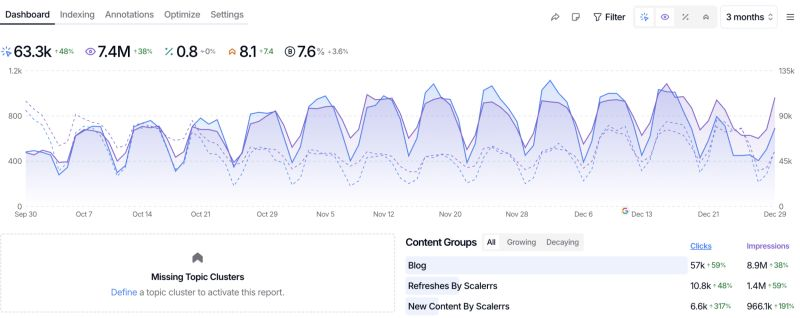
Use Google Search Console to export indexed pages, impressions, clicks, and coverage reports. Export keyword rankings from Ahrefs or Semrush, then save GA4 landing page and conversion reports for comparison after launch. If you haven't already, run a Saas SEO audit before the migration to identify technical issues that need fixing first.
Step 2: Crawl and Inventory Every Existing URL
You can't create redirect rules until you know exactly what exists on your current site.
Run a complete crawl of your current website and inventory every indexable URL, including blogs, product pages, help documentation, integrations, comparison pages, PDFs, and image assets where relevant. This becomes the master record for everything that needs to be preserved, redirected, consolidated, or intentionally removed.
This step also surfaces existing technical debt. Broken pages, duplicate content, redirect chains, and orphan pages are much easier to clean up before a migration than after.
How To Do This In Practice
Pull URLs from these four sources to get a snapshot of every page’s performance:
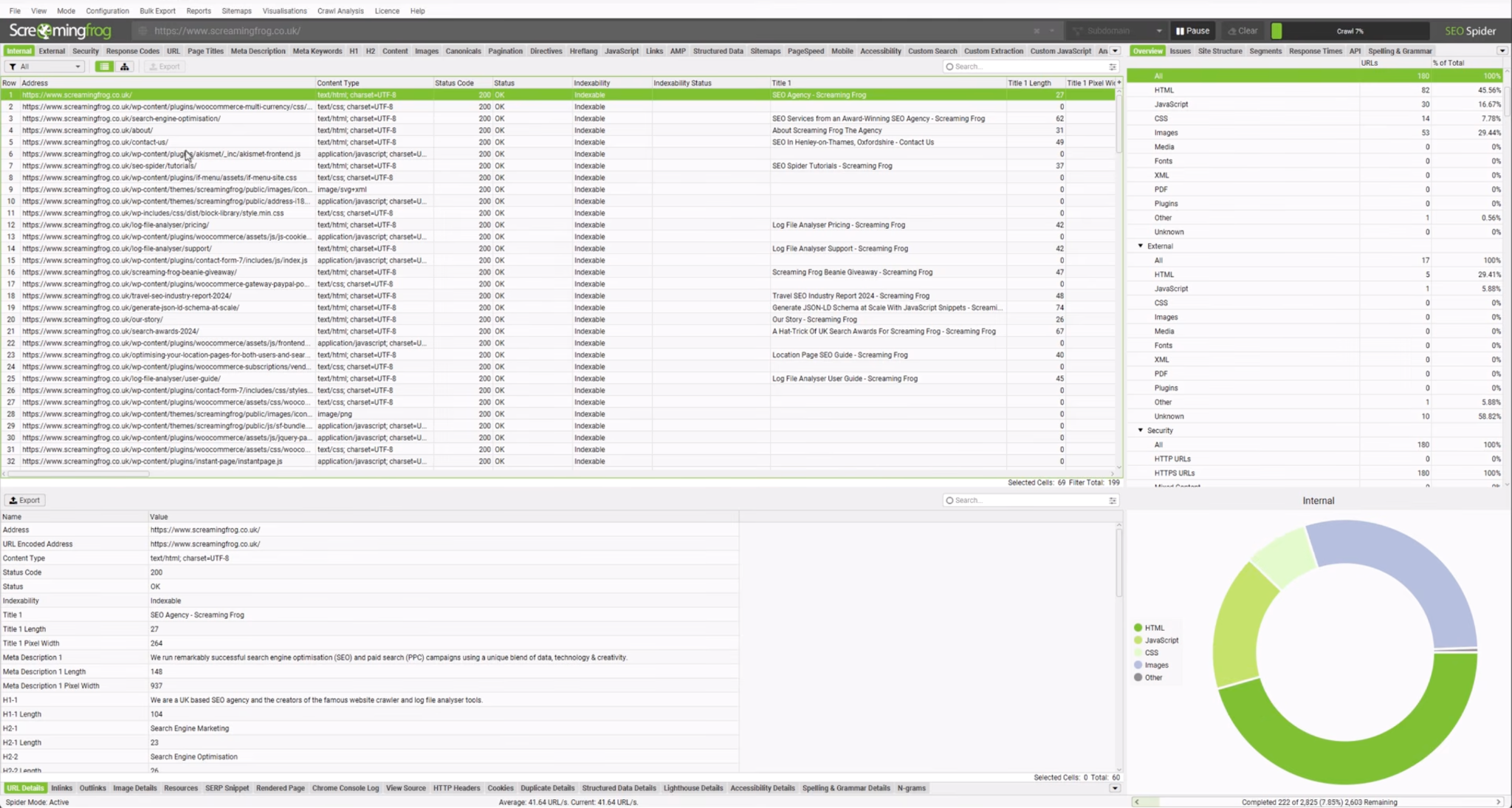
- Screaming Frog crawl of the live site
- XML sitemap exports (main, blog, product, video, image)
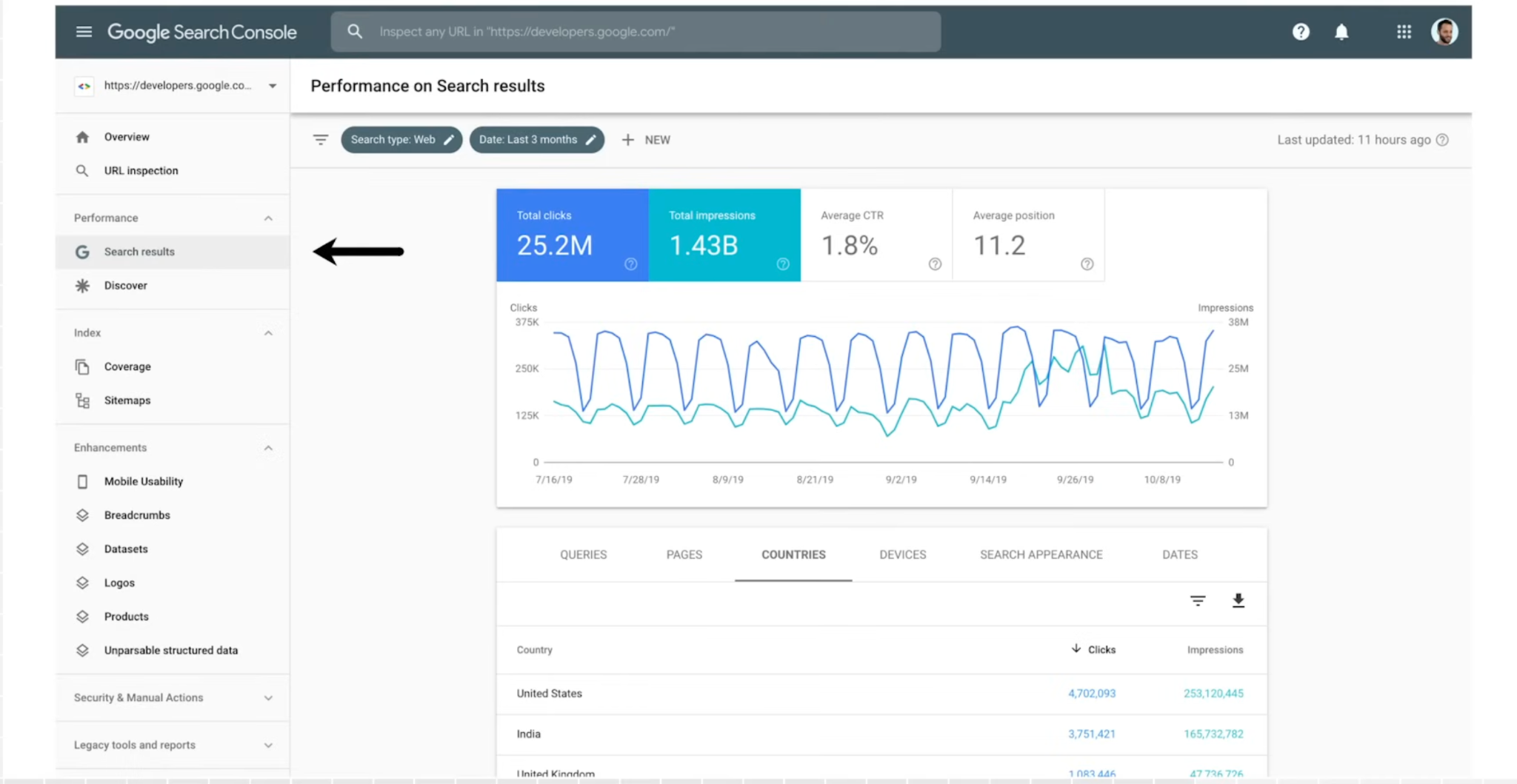
- Google Search Console performance report (any page with impressions in the last 12 months)
- Ahrefs or Semrush top pages report (catches URLs that get traffic but aren't in your sitemap)
Then identify the metrics that will tell you whether the migration worked.
For every URL, we recommend tracking:
- Organic clicks and impressions (GSC, last 90 days)
- Ranking keywords and positions (Ahrefs or Semrush)
- Backlink count and referring domains (Ahrefs)
- Conversion rate and demo requests (GA4)
- Core Web Vitals (GSC Core Web Vitals report)
- AI citation volume, if tracked (with tools such as Profound, Peec AI, Promptwatch, Ahrefs Brand Radar)
Step 3: Create Your URL Mapping and Redirect Plan
This is the single most important document in your migration.
Every existing URL should have a clearly defined destination post-migration. In most cases, that means a one-to-one redirect to the closest equivalent page.
If you're restructuring your information architecture, preserve successful URLs wherever possible. In our experience, changing URLs simply because they "look cleaner" rarely justifies the additional migration risk.
How To Do This In Practice
Build a spreadsheet with four main columns: Old URL, New URL, Redirect Type (301), and Status. Review every redirect manually before launch. You can also track the priority and ownership for each URL to keep things clean. Any URL in your top 100 by traffic, backlinks, or pipeline value should be manually reviewed.
Step 4: Check for Content Parity
Redirects transfer authority. But if the destination page doesn't actually cover the same intent as the source page, Google will eventually rank it lower. Which is why URL mapping isn't just a technical SEO exercise.
For every high-priority page (top 100 by traffic, top comparison pages, pricing, top BOFU landing pages), check:
- Does the new page answer the same query as the old page?
- Are the H1, primary keywords, and semantic structure preserved (or intentionally improved)?
- Are schema types (SoftwareApplication, FAQPage, Article, BreadcrumbList) implemented on the new page?
- Are internal links and external backlinks going to the correct new URL?
Step 5: Audit the New Site Before It Goes Live
Before launch, the new site has to pass a full technical review in staging. This is where the silent killers get caught. The ones that would otherwise ship to production.
Run these checks on staging:
- Robots.txt allows Googlebot, Bingbot, and AI crawlers (GPTBot, ClaudeBot, PerplexityBot, Google-Extended)
- No noindex tags on indexable pages
- Canonical tags point to production URLs, not staging URLs
- XML sitemap generates correctly with production URLs
- Redirects resolve directly to a 200 page (no chains or loops)
- Structured data validates (Rich Results Test on every template type)
- Hreflang implemented if multi-region
- Core Web Vitals pass on money pages
- JavaScript-rendered content is visible in raw HTML (disable JS in your browser and reload)
How To Do This In Practice
Crawl the staging environment with Screaming Frog, validate schema using Google's Rich Results Test, inspect key pages in Google Search Console where possible, and compare the results against your original inventory.
Step 6: Align Your Team and Prepare a Rollback Plan
Website migrations are rarely just an SEO project.
Each team plays their part: engineering owns deployment, marketing looks after content, product teams often change navigation. Without clear ownership, small mistakes compound quickly, even as leadership expects zero downtime.
To prevent these, define who signs off on redirects, who monitors Search Console, who validates analytics, and who has authority to pause or roll back the deployment if critical issues appear. Google also recommends migrating during periods of lower traffic where possible, reducing business impact if unexpected issues occur.
How To Do This In Practice
Create a migration runbook covering responsibilities, launch timeline, rollback procedures, and success metrics. Before launch, ensure every stakeholder has approved the redirect map, sitemap, analytics, and QA results.
During Migration Checklist: What to Lock In on Launch Day (The Protect Phase)
Avoid making last-minute content edits or structural changes on launch day. Your only goal here is to verify that everything behaves exactly as planned.
This is the Protect phase of the migration. Every step below helps search engines, AI crawlers, and users transition smoothly from the old site to the new one.
Step 1: Enable Redirects and Validate High-Value Pages
Deploy your redirect rules first, then immediately test your most valuable URLs. Prioritize pages driving demos, organic traffic, and backlinks before checking the rest of the site. Google recommends permanent server-side redirects (301 or 308) wherever possible and advises avoiding unnecessary redirect chains.
How To Do This In Practice
Crawl your redirect mapping with Screaming Frog in List Mode and confirm every URL resolves directly to its intended destination with a single 301 followed by a 200 response.
Launch Checklist
- ☑ Redirects active
- ☑ No redirect chains
- ☑ Priority pages resolve correctly
- ☑ No unexpected 404s
Step 2: Remove Crawl Blocks and Submit Your New Sitemap
Before launch, staging environments often use robots.txt blocks or noindex directives. Forgetting to remove them is one of the fastest ways to disappear from search.
Once the site is live, submit your updated XML sitemap through Google Search Console so Google can discover your new URLs faster. If you've migrated to a new domain, submit a Change of Address request as well.
Launch Checklist
- ☑ Robots.txt verified
- ☑ No staging noindex tags
- ☑ XML sitemap submitted
- ☑ Change of Address submitted (if applicable)
Step 3: Verify Internal Links, Canonicals, and Structured Data
Every navigation menu, CTA, breadcrumb, canonical tag, schema reference, and XML sitemap should already point directly to the new URLs. This reduces unnecessary crawling and preserves stronger signals for both Google and AI retrieval systems.
For SaaS companies, double-check SoftwareApplication, FAQ, Breadcrumb, and Organization schema. These often contribute to AI Overviews and answer engines understanding your product.
Launch Checklist
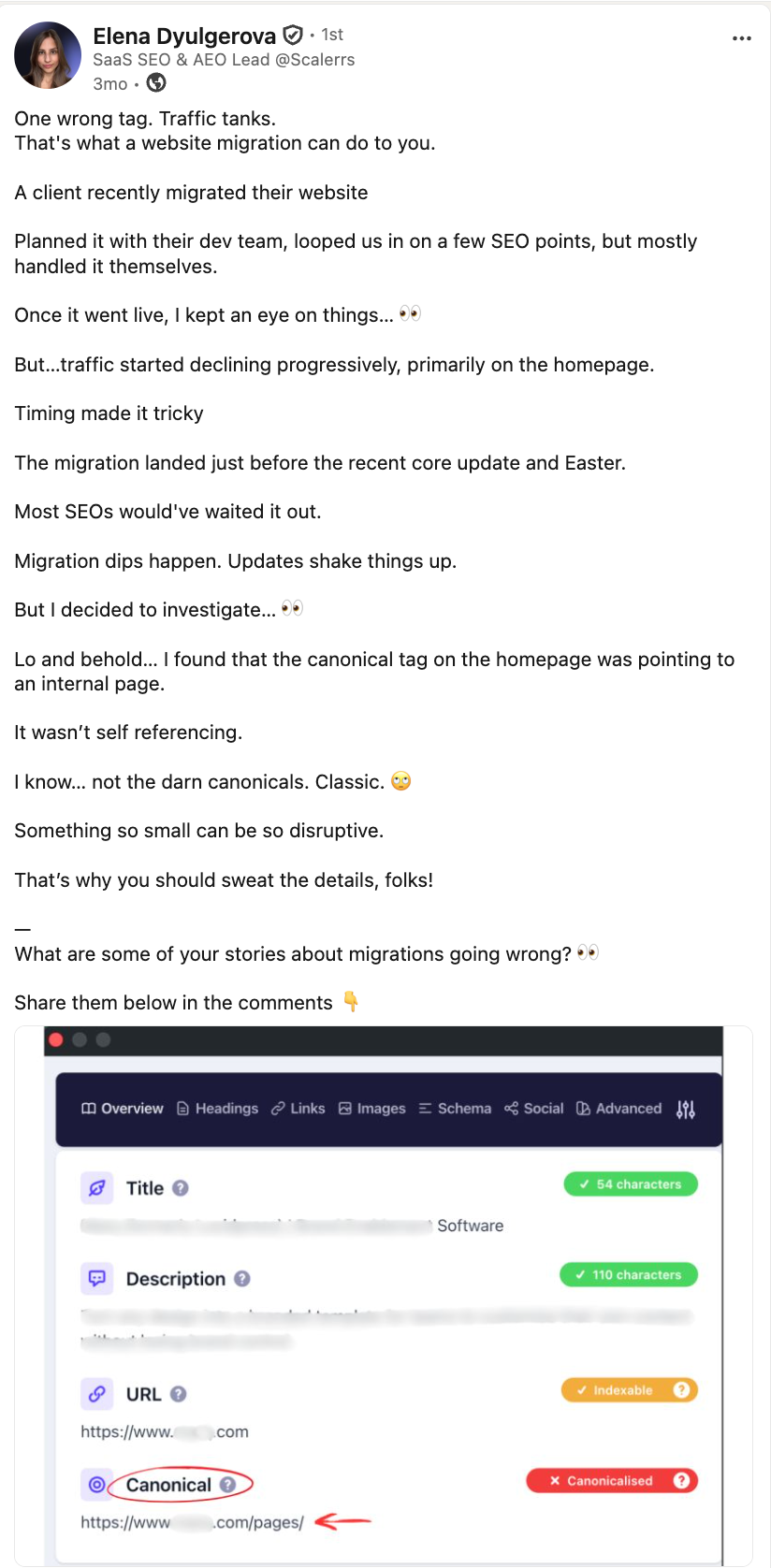
- ☑ Canonicals updated
- ☑ Internal links updated
- ☑ Schema validates
- ☑ No broken navigation
Elena shares how a simple misdirected canonical tag can cause a significant traffic drop after a migration:
Step 4: Confirm Analytics and Conversion Tracking
SEO performance means little if your reporting breaks at the same time.
Confirm GA4, Google Tag Manager, CRM forms, demo bookings, product signups, and attribution events all fire correctly.
Use GA4 DebugView, Google Tag Assistant, and your CRM to complete a test conversion from landing page through form submission.
Launch Checklist
- ☑ GA4 collecting data
- ☑ GTM firing correctly
- ☑ Forms working
- ☑ Demo conversions recorded
Step 5: Update Internal Cross-References
Any owned properties that pointed at the old site need to be updated. Make sure you cover email footer templates, social profiles, Google My Business (if you have a listing), GitHub READMEs, help center links, as well as product in-app links.
Launch Checklist
- ☑ All owned properties updated with new URLs
Step 6: Validate Structured Data and Rich Results
Run the Rich Results Test on a sample URL from every template type on the new site. Check the GSC Enhancements report over the next few days for new errors.
If structured data is injected client-side, Googlebot may not process it on the first crawl. That's why the schema needs to be server-rendered from launch. Losing rich results after migration is one of the more common regressions we see.
- ☑ Rich Results Test passes on all template types
- ☑GSC Enhancements monitored for new errors
Step 7: Run One Final Crawl Before You Walk Away
Don't assume the deployment succeeded because the homepage loads.
Run a fresh crawl against the live website and compare it with your pre-launch crawl. Look for unexpected 404s, redirect loops, orphan pages, duplicate titles, server errors, or pages returning the wrong status codes. Google also recommends watching server capacity because crawlers temporarily increase their activity after major migrations.
Launch Checklist
- ☑ Full crawl completed
- ☑ Critical errors resolved
- ☑ Server health stable
- ☑ Search Console monitored
Post Migration Checklist: The First 90 Days (The Prove Phase)
The launch is over. Now comes the hardest part: waiting.
Google needs time to crawl every old and new URL, consolidate ranking signals, and process redirects. AI search engines also need time to rediscover your updated content and reconnect it with existing entities and citations. So, some movement is normal. What matters is whether the trend is heading in the right direction.
This is the Prove phase of the migration. Your job here shifts from implementing changes to validating that they worked.
Here’s what normal looks like:
The First 48 Hours
Watch Google Search Console almost continuously during the first two days. Look for crawl errors, indexing failures, unexpected 404s, redirect problems, and sudden drops in indexed pages. Validate that new URLs are being discovered and that analytics are collecting clean data.
- Review Search Console, server logs, and GA4 every few hours
- Re-test your highest-value landing pages manually.
If organic traffic drops 20-30% in the first 48 hours, that's within normal reindexing range. Don't panic-roll-back.
The First Week
Google is actively reprocessing your site. Expect volatility.
- Daily check of GSC Coverage report. Index the "why not indexed" reasons and fix template-level issues
- Log file review. Confirm that Googlebot is crawling the new URLs at expected volume?
- Ranking monitor. Pull your top 50 keywords daily, and watch for stabilization patterns
- Redirect error monitor. Any 404s in the referral logs need immediate 301s.
- AI citation check. For teams tracking Profound / Peec / Promptwatch data, run a snapshot to compare against pre-launch performance.
The First 30 Days
By now, Google should be processing most redirects and indexing the majority of your new URLs. Focus on pages that continue losing visibility. Check whether they're receiving backlinks, whether redirects point to the best destination, and whether the new content still satisfies the same search intent.
For SaaS teams, monitor commercial pages first. Losing rankings on product, pricing, integrations, or comparison pages hurts pipeline far more than losing a blog post.
- Compare organic clicks month-over-month by page group (product, blog, comparisons, docs). Uneven recovery is a signal
- Compare backlink profiles. Are external sites still pointing at the old URLs? Follow up.
- Review internal linking. Every new page should have at least 2-3 contextual internal links. Orphan pages die quickly.
- Rebuild any lost rich results and structured data
- Resubmit sitemap if index coverage is lagging
The First 90 Days
By the three-month mark, most migrations should be stabilizing. Rankings may not have returned to exactly the same positions, especially if you've redesigned the site, but overall trends should be improving. If important sections continue declining, perform a fresh technical audit before assuming it's an algorithm issue.
This is also the right time to measure AI visibility again. Check whether your brand appears in Google AI Overviews, ChatGPT, and Perplexity for your primary commercial queries compared with your pre-launch benchmark.
- Perform a 30/60/90 day review against baseline. Any URL group down more than 25% at day 30 needs investigation.
- Refresh the top 20 traffic pages if they're not fully recovering. Sometimes a content update on the new page speeds up re-ranking.
- Continue backlink outreach for any high-authority referrers still pointing at old URLs.
When to worry vs when to wait: Wait if the drop is 20-30% and stabilizing week over week. Worry if the drop is 40%+, or if it's still getting worse at week 6, or if specific high-value page groups (pricing, product, top comparisons) are down more than the site average. Those signals mean something is structurally broken and needs diagnosis.
Your migration has to work across Google Search, AI Overviews, and the LLMs your buyers research inside.
That's why our SaaS SEO service is built around multi-surface visibility from the start.
When we handled Korona POS's recovery after multiple Google updates disrupted their content architecture, we didn't just rebuild rankings. We rebuilt the site so it could earn citations in Google AI Overviews alongside their biggest competitors—Square, Shopify, and Lightspeed.
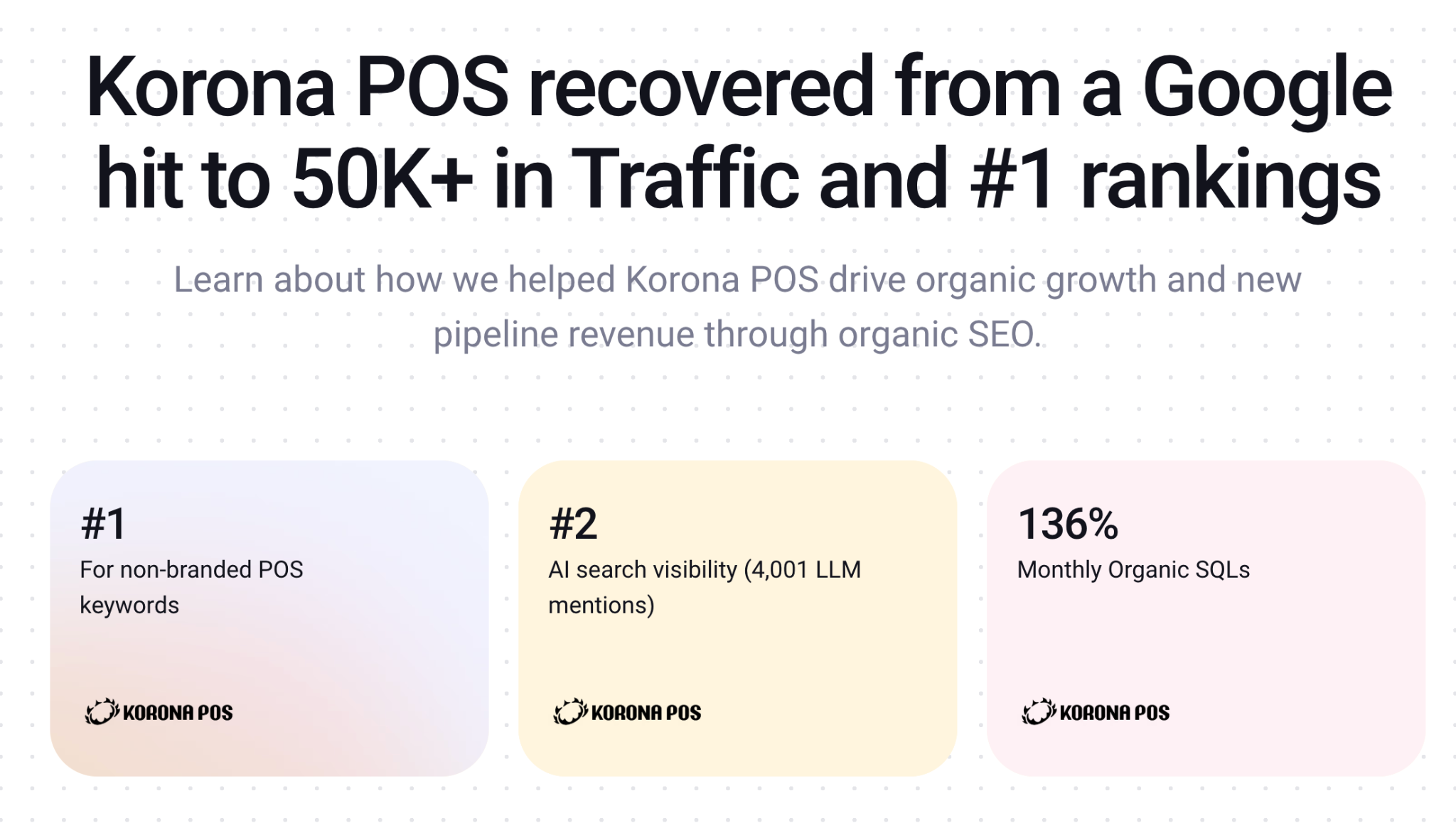
The results: Traffic came back at 166% of the previous baseline, and monthly SQLs grew 136%. Migration recovery and AI visibility stemmed from the same motion.
Common Website Migration Mistakes
The mistakes below are the ones we see repeatedly, but the good news is that most of them are avoidable.
- Redirecting everything to the homepage. Google expects old pages to redirect to the most relevant equivalent, not the homepage. One-to-one redirects preserve context for both users and search engines.
- Deleting the old XML sitemap too early. Keep it live for at least 90 days. Google uses it to find URLs to reprocess into the new locations.
- Stopping monitoring after launch. Launch day isn't the finish line. Some of the biggest issues only appear after Google has recrawled a significant portion of the site, which is why we monitor every migration closely for at least the first 90 days.
- Assuming AI citations will follow rankings. They often don't. LLMs cache old URLs and old brand mentions from Reddit threads, listicles, and third-party publications. Recovering rankings doesn't automatically restore your AI visibility. The citations built on third-party mentions need to be rebuilt too.
That last mistake is where a lot of SaaS teams are getting caught right now. When your brand loses AI visibility during a migration, it's usually because the third-party listicles, Reddit threads, and comparison pages that fed your citations are still linking to old URLs, mentioning old positioning, or pointing at pages that no longer exist.
How to Rebuild Lost AI Citations After a Migration
Here's the specific playbook we run for clients post-migration.
Step 1: Inventory where you were being cited before launch
For each of your top 20 commercial queries, run the same prompt inside ChatGPT, Perplexity, Claude, Gemini, and Google AI Mode. Screenshot the answer and record which sources the model cited.
Tools like Profound, Peec AI, Promptwatch, and Ahrefs Brand Radar automate this at scale, but manually pulling your top 20 queries is enough to start.
You're building a list of the specific URLs that AI models pull from when they mention your brand.
Step 2: Categorize the sources by fixability
Not every citation source needs the same treatment. Group them into four buckets:
- Your own domain pages, such as blog posts, comparison pages, product pages that got redirected: These recover through your redirect map, assuming the redirects are one-to-one and schema survived the move
- Third-party listicles and "best of" articles on G2, Capterra, "best [category] tools" roundups: These need direct outreach because the editor has an old URL cached and needs the new one
- Reddit threads, forum posts, and community mentions where someone links to a page that now 404s or redirects. These are harder because you can't edit someone else's post, but you can drop a follow-up comment with the new URL if the thread is still active.
- Structured data and entity signals: Think SoftwareApplication schema, Organization schema, Wikipedia/Wikidata entries. These need direct fixes on your new site or through Wikidata edits.
Step 3: Prioritize outreach by citation frequency
Pull each URL from your baseline through Ahrefs to see referring domain count and organic traffic. Sort by combined authority + how often that URL appears in your AI citation baseline. For the pages that show up in five or more of your target-query AI answers, start your outreach in week one. The rest can be batched over the next 60 days.
Step 4: Send the outreach
For third-party listicles, keep the message short. Name the article, give the old URL, give the new URL, and offer any updated data the editor might want (new pricing, updated feature list, fresh case study). Editors update links faster when you make the swap easy.
For Reddit and community mentions, don't spam edits or comments across every old thread; moderators will notice. Pick the threads still getting traffic, drop one helpful comment with the new URL, and move on.
Step 5: Re-run your citation audit at day 30, 60, and 90
Compare against your pre-migration baseline. Rankings might recover in 2-6 weeks. Citations often take 60-90 days as AI models re-crawl the updated third-party sources and rebuild confidence in your new URLs.
When NOT to Migrate
The most avoidable migration failures come from bad timing. Before you set a launch date, rule these out:
- The week before Black Friday, end-of-quarter, or your peak season. Any migration produces short-term volatility. Don't stack it on your highest-stakes traffic window.
- During a Google core update rollout. Diagnosis becomes impossible. Watch Search Engine Roundtable for update announcements and delay if one's active or expected within two weeks.
- Before a funding announcement or major product launch. Both need PR-driven traffic to land on a stable site. Ship the migration first, let it settle, then push the announcement.
- Without a baseline crawl. If you can't compare before-and-after, you can't diagnose what broke. This is non-negotiable.
- When changing domain + CMS + URL structure simultaneously. Split it. Move domain first, settle, then restructure.
- Without a rollback plan. Every migration needs a documented trigger and process for reverting
FAQs
1. How long does a website migration take from start to launch?
It depends. A small SaaS website can often be planned and migrated within a few weeks, while enterprise websites with thousands of URLs typically require several months of planning, testing, and validation.
2. Is it normal to lose traffic right after a migration?
Yes. Temporary fluctuations are expected while Google recrawls, reindexes, and transfers ranking signals. According to Google's guidance, small and medium-sized websites often stabilize within several weeks, while larger sites can take longer.
3. Should I migrate during a busy season or a slow one?
Slow, always. Migrations produce short-term volatility even when they go well. Doing that during Q4 when demo requests matter most is a bad trade. Pick a window with lower stakes on organic traffic and no active Google core update.
4. Do I need to keep my old domain after a domain migration?
Yes. Keep the old domain registered and the 301 redirects live for at least 90 days. Google keeps checking the old URLs long after the move, and dropping the redirects too early means severing authority that's still transferring.
5. When should I hire an SEO agency for a website migration?
Ideally before you finalize the new site architecture. By the time SEO gets involved after the fact, the URL structure is usually locked in and 1:1 mapping becomes forced. The best moment to bring in a migration partner is Day 1 of planning. That is when redirect logic, information architecture, and staging QA can still be designed properly.

