


SaaS Technical SEO: Common Issues & How to Fix Them (2026)

Key Takeaways
- Technical SEO for SaaS is about making your website easy for search engines and AI systems to crawl, understand, and trust. That means fixing indexing, rendering, site architecture, and performance before they become growth bottlenecks.
- SaaS websites accumulate technical debt faster than most sites because product launches, feature pages, documentation, integrations, and changelogs constantly expand the site. Without regular maintenance, that debt hurts rankings, AI visibility, and conversions.
- Google's AI-powered search experiences have raised the bar for technical quality. Fast, well-structured, crawlable websites are more likely to earn visibility across Search, AI Overviews, and AI assistants.
- A technical SEO audit should go beyond finding errors. It should identify the fixes most likely to improve qualified traffic, demo requests, and pipeline.
Why Technical SEO Is Critical for SaaS Companies
Technical SEO isn't the flashiest part of SEO. Your buyers will never compliment your canonical tags or XML sitemap. But they'll notice when product pages don't appear in search, pricing pages take too long to load, or AI search tools don’t accurately talk about your product.
Here's why it hits SaaS harder than most industries:
- Your online presence is your best salesperson: Two-thirds of B2B buyers now prefer a rep-free buying experience. That means your feature pages, pricing page, comparison pages, and integration directory are doing the sales job before your team knows the deal exists. Not maintaining their technical health can cost you customers.
- SaaS sites are JavaScript-heavy by default: Most modern SaaS sites are built on React, Next.js, Vue, or Nuxt. That's fine for product UX, but if your marketing pages ship without server-side rendering (SSR) or static generation, Googlebot may see a blank shell where your content should be.
- The site sprawls faster than the team can maintain it: Every feature release adds URLs. Documentation, changelogs, help centers, templates, and subdomains all multiply fast. That sprawl creates the classic SaaS technical SEO problems: index bloat, cannibalization between near-duplicate templates, orphaned pages, and crawl budget wasted on low-value pages.
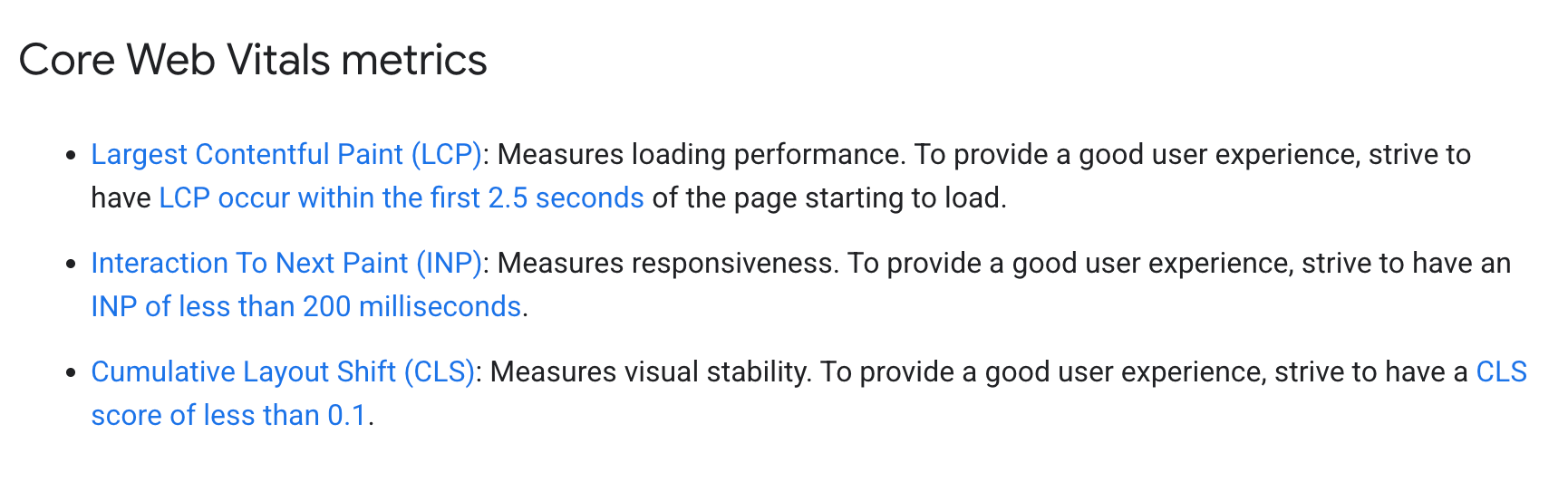
- Core Web Vitals impact your business, not just rankings: Improving Core Web Vitals for your website can increase conversions and engagement, yet fewer than half of websites currently pass all Core Web Vitals thresholds. For SaaS businesses, where a single landing page often determines whether a visitor books a demo or signs up, performance directly influences revenue.
- AI search doesn't rescue you from technical debt: There's a myth going around that Answers Engine Optimization (AEO) makes technical SEO less important. It's the opposite. LLMs pull from crawled, indexed, cleanly structured content. If Googlebot can't get to your comparison page, GPTBot probably can't either, and your brand doesn't show up in the AI answer.
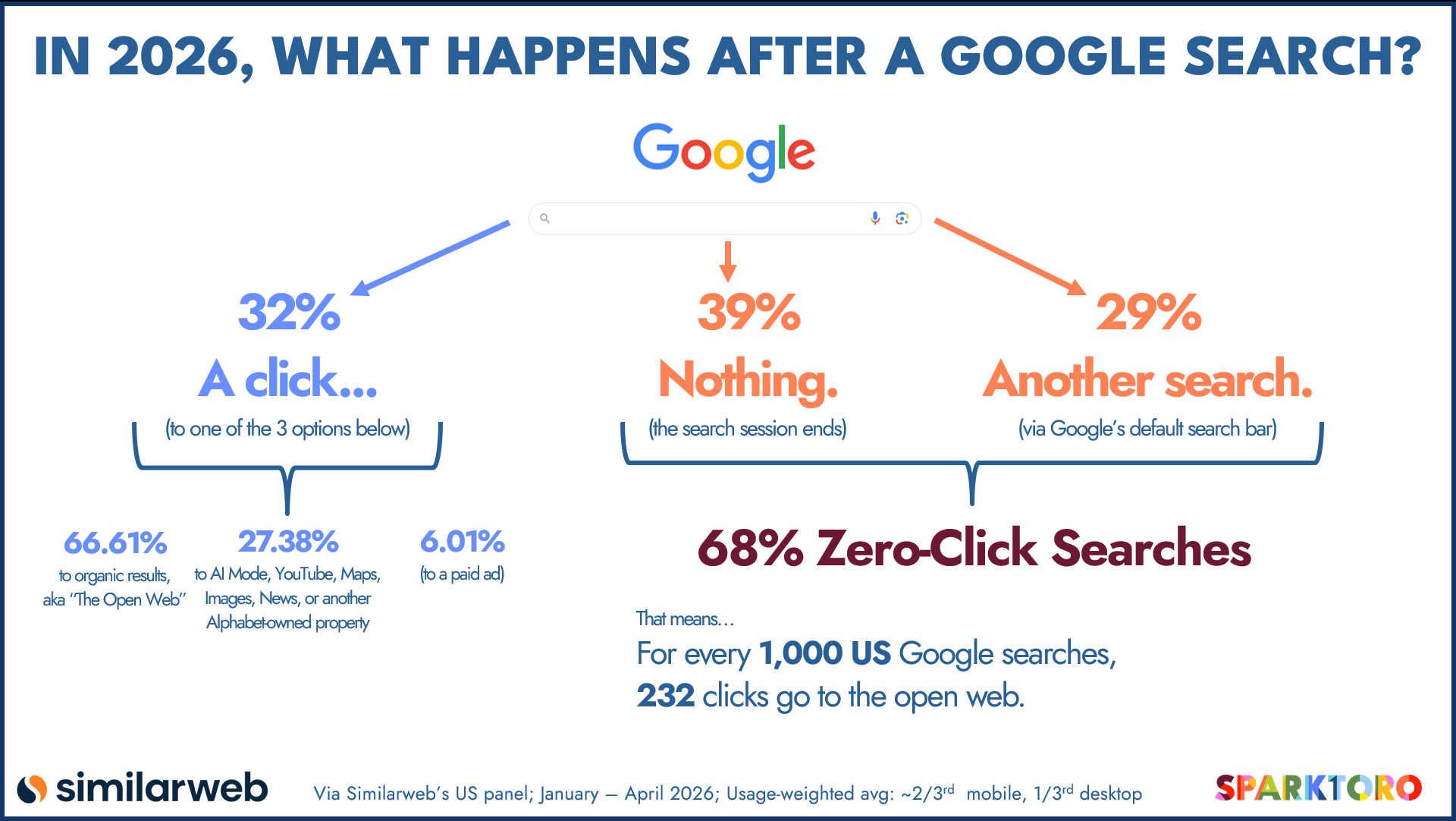
SparkToro’s 2026 research found that 68.01% of Google searches now end without a click, making every opportunity to appear in AI-generated answers and rich search experiences more valuable than ever.
Here's how the same technical issue plays out differently for SaaS versus other verticals:
That's one reason our team rarely treats technical SEO as a standalone project. It works best alongside strong content, clear information architecture, AEO/GEO, plus authority signals from sources like Reddit, YouTube, and trusted third-party publications. The technical foundation makes the rest of your SEO investment work harder.
If you're not sure whether technical issues are limiting your organic growth, our audit helps uncover the biggest bottlenecks—from crawl efficiency and rendering issues to indexation, site architecture, and performance. You'll receive a prioritized roadmap focused on the fixes most likely to improve rankings, traffic, and conversions.
Book a free strategy call with our team to get started.
{{cta-general="/cta/book-a-discovery-call-general-catch-all"}}
The Four Pillars of SaaS Technical SEO
Ask five technical SEOs to explain technical SEO, and you'll probably get five different checklists. We've found it's easier to think in systems instead.
Every technical issue ultimately breaks one of four things:
- Discovery: Can search engines and AI crawlers find your pages and spend time on the ones that matter to your business?
- Understanding: Can they understand what each page is about, how pages relate to each other, and how authority flows between them?
- Delivery: Can they access and render the content the same way your buyers do?
- Trust: Can they confidently index, consolidate, and rank the right version of every page based on signals from the canonicals, schema, hreflang, and metadata?
If you can maintain these four systems consistently, most technical SEO issues will become much easier to diagnose and prioritize.
Framework #1: Discovery
Before Google can rank a page, it has to find it. That sounds obvious. Yet discovery problems are some of the highest-impact issues we uncover during a technical SEO audit.
Here's what to fix, in order of priority:
Audit what's actually indexed vs. what should be
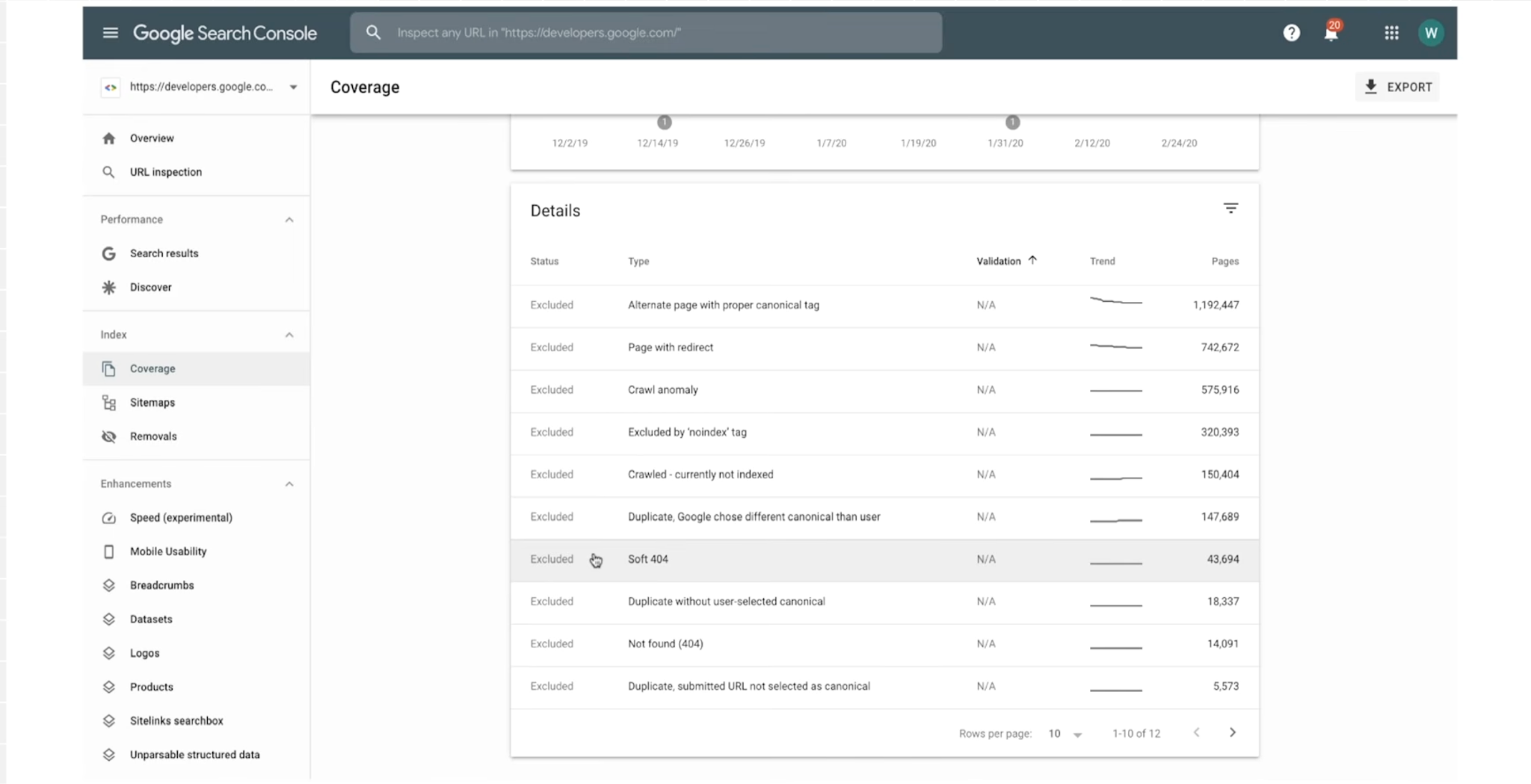
Open Google Search Console, go to Page Indexing, and compare indexed pages against your XML sitemap. If you have 400 URLs but only 240 are indexed, investigate the gap, but don’t assume every missing URL is a problem. Google often omits low‑value, thin, or duplicate pages even if they’re in the sitemap.
Common causes still include accidental noindex tags, incorrect canonicals, robots.txt blocks, and soft 404s, plus “Crawled – currently not indexed” for quality or crawl‑budget reasons. For each URL in the “Not indexed” bucket, use the URL Inspection tool to confirm why and sample multiple URLs per issue type.
Kill index bloat
Indexing everything is just as harmful as indexing too little. Parameter combos, faceted navigation, tag archives, old changelogs, paginated blog listings, and thin location pages consume crawl budgets without driving traffic.
Focus on:
- Adding noindex, follow to low-value URLs
- Consolidating near-duplicate templates with canonicals pointing to the primary version
- Removing parameter URLs from XML sitemaps
- Using robots.txt to block crawler access to authenticated app routes and internal admin paths (never to your marketing pages)
Let AI crawlers in
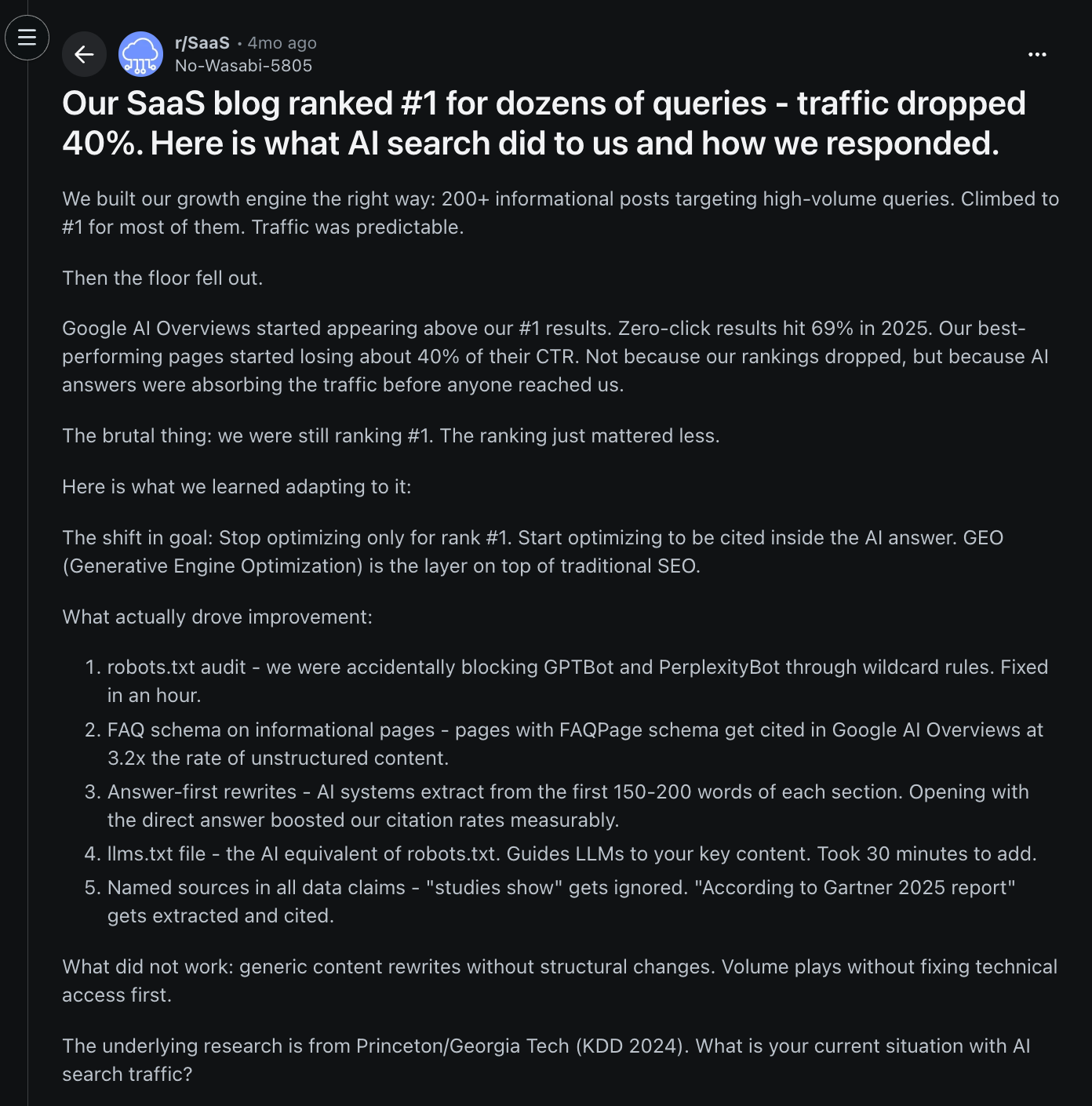
If your robots.txt blocks GPTBot, ClaudeBot, PerplexityBot, or Google-Extended, your content may be excluded from AI-powered search experiences. Unless you're intentionally restricting AI training, allow these crawlers and ensure important content is available in the raw HTML.
One Redditor shares that the first step they took to start optimizing for AI search was to unblock GPTBot and PerplexityBot, which were accidentally blocked in their robots.txt!
Analyze your log files
Log files reveal how Googlebot actually crawls your site. Review 30 days of verified Googlebot traffic to identify:
- Pages crawled most frequently
- Templates consuming excessive crawl budget
- Pages ignored for 60+ days
- Recurring 4xx or 5xx errors
Tools like Screaming Frog Log Analyzer, JetOctopus, and Botify simplify the process. Cross-reference crawl data with Search Console impressions to uncover pages that are over-crawled but underperforming, or valuable pages that need stronger internal linking.
Framework #2: Understanding
Once Google can crawl your site properly, the next question is: does the crawler understand what matters?
Site architecture is how you answer that. It's the invisible layer that tells search engines and AI models which pages are important, how they relate to each other, and what your site is topically authoritative on.
Here are some actionable tips to secure this pillar:
Keep money pages within three clicks of the homepage
Your product, pricing, comparison, and category pages should be reachable within three clicks of the homepage. A hub-and-spoke structure—where category hubs link to related product and comparison pages—keeps important content easy to discover without cluttering navigation.
If a buyer needs five clicks to get from / to /vs/competitor, so does Googlebot, and it'll crawl that page less often, index it slower, and rank it lower.
Fix orphaned pages
Orphan pages have no internal links pointing to them, making them difficult for search engines to discover and rank. Ahrefs says 66.2% of websites have pages with only one internal link. Such pages commonly occur for SaaS when new comparison, integration, or alternatives pages are published without linking them from relevant hubs.
The fix? Pull the orphan pages list using Ahrefs or Screaming Frog. For each one worth keeping, add contextual internal links from two or three related pages. It's the highest-ROI internal linking work you can do.
Stop trapping authority in your blog
Many SaaS blogs attract backlinks but never pass authority to commercial pages.
For every top-performing blog post you have, add two to three contextual links to its most relevant product, comparison, or alternatives page. Use descriptive anchor text that matches how buyers search. "Our proposal software" beats "click here" every time.
Build topic clusters
Organize content into pillar pages supported by related articles that interlink with one another, and with your commercial pages. A cluster around "sales proposal software," for example, should naturally connect readers to your product, pricing, and competitor comparison pages.
Fix redirect chains and internal 404s
Long redirect chains dilute link equity, while internal links to 404 pages waste crawl budget and authority. Rebrands, pricing changes, and product renames often create these issues, so audit them quarterly with Screaming Frog or a similar crawler.
👉🏽 Need help keeping your architecture optimized as your site grows? The Scalerrs team continuously audits internal linking, site structure, and crawl efficiency so your highest-value pages stay easy for both search engines and buyers to find. Explore our SaaS SEO services today.
Framework #3: Delivery
Discovery and architecture don't matter if search engines can't access the content you're publishing. That's where delivery comes in.
Frameworks like React, Next.js, Vue, or Nuxt deliver excellent user experience, but they also introduce rendering complexity for websites.
Aim for server-side rendering for indexable pages
Google's rendering process happens in two stages. It crawls the HTML first, then renders JavaScript later if resources allow. If essential content only appears after delayed API requests, client-side rendering, or hydration, Google may not see the page the way your users do.
Google's own documentation puts it plainly: "Server-side or pre-rendering is still a great idea because it makes your website faster for users and crawlers, and not all bots can run JavaScript."
Frameworks that make this easy to implement:
- Next.js (React): SSR and SSG built in
- Nuxt.js (Vue): SSR/SSG for Vue apps
- Remix: React with server-first data loading
- SvelteKit: Svelte with SSR by default
- Astro: Great for content-heavy marketing sites; ships zero JS by default
Optimize Core Web Vitals
On a demo request page or a self-serve signup, every hundred milliseconds of delay can cost you revenue.
Core Web Vitals are the three metrics that measure this user experience. They're a confirmed ranking signal, but they also play an equally big role in conversion.
For context, a case study on Rakuten 24, a business unit within the Rakuten ecosystem, documented a 33.13% increase in conversion rate and a 53.37% increase in revenue per visitor after optimizing all three Core Web Vitals.
Common optimization fixes we recommend for SaaS marketing pages:
- Compress hero images and serve WebP or AVIF instead of PNG or JPG
- Lazy-load below-the-fold content, but never the LCP element
- Defer or async non-critical JavaScript (chatbots, analytics, marketing pixels)
- Move heavy third-party scripts (customer.io, HubSpot, Intercom) to load after interaction
- Reserve space for embeds and images (set width and height) to kill CLS
- Break up long JavaScript tasks that block INP
Framework #4: Trust
The final system determines whether search engines trust your technical implementation enough to consolidate authority around the right pages. This influences whether you win rich results, get cited in AI answers, and rank in the right country.
And it’s not hard to implement:
Canonical tags: Pick one URL per page and stick to it
Canonicals tell Google which version of a page is the "real" one when duplicates exist. SaaS sites create canonical chaos in three ways:
- Trailing slash inconsistencies (/pricing vs. /pricing/)
- HTTP vs. HTTPS still lingering after a migration
- Parameter URLs (/features?utm_source=linkedin, /blog/post?ref=twitter)
The fix: every indexable page has a self-referencing canonical pointing at the clean, absolute URL. Every parameter URL canonicals back to the clean version. Test with the URL Inspection tool in Search Console. It'll tell you the "Google-selected canonical" and if that doesn't match yours, you have a signal conflict.
Schema markup: Talk in the language AI understands
Schema is structured data (usually JSON-LD) that tells search engines and LLMs exactly what your page contains. For SaaS, focus on these three schema types:
- Organization schema on the homepage and about page: Connects your brand entity to Wikidata, Crunchbase, and your social profiles via sameAs
- SoftwareApplication (or WebApplication) on your product and feature pages: Declares the product name, pricing, operating system, category, and aggregate ratings
- FAQPage on any page with genuine FAQs
Add BreadcrumbList schema to your site-wide breadcrumbs and Article schema to your blog posts, and you've covered most of what matters.
Is schema a ranking factor? Not directly. But it's a comprehension factor, and comprehension is what gets you cited.
Martha van Berkel, CEO of Schema App, confirmed this in a June 2026 analysis of AI search:
"In March, both Google and Microsoft publicly stated that they use Schema Markup for their Generative AI features. Google was explicit: Structured data is critical for modern search features because it is efficient, precise, and easy for machines to process."
Translation: if you want to show up in ChatGPT and AI Overviews, help the machines understand your page.
At Scalerrs, we help SaaS companies build the technical foundation for Answer Engine Optimization—from schema strategy and entity optimization to information architecture and content built for AI retrieval.
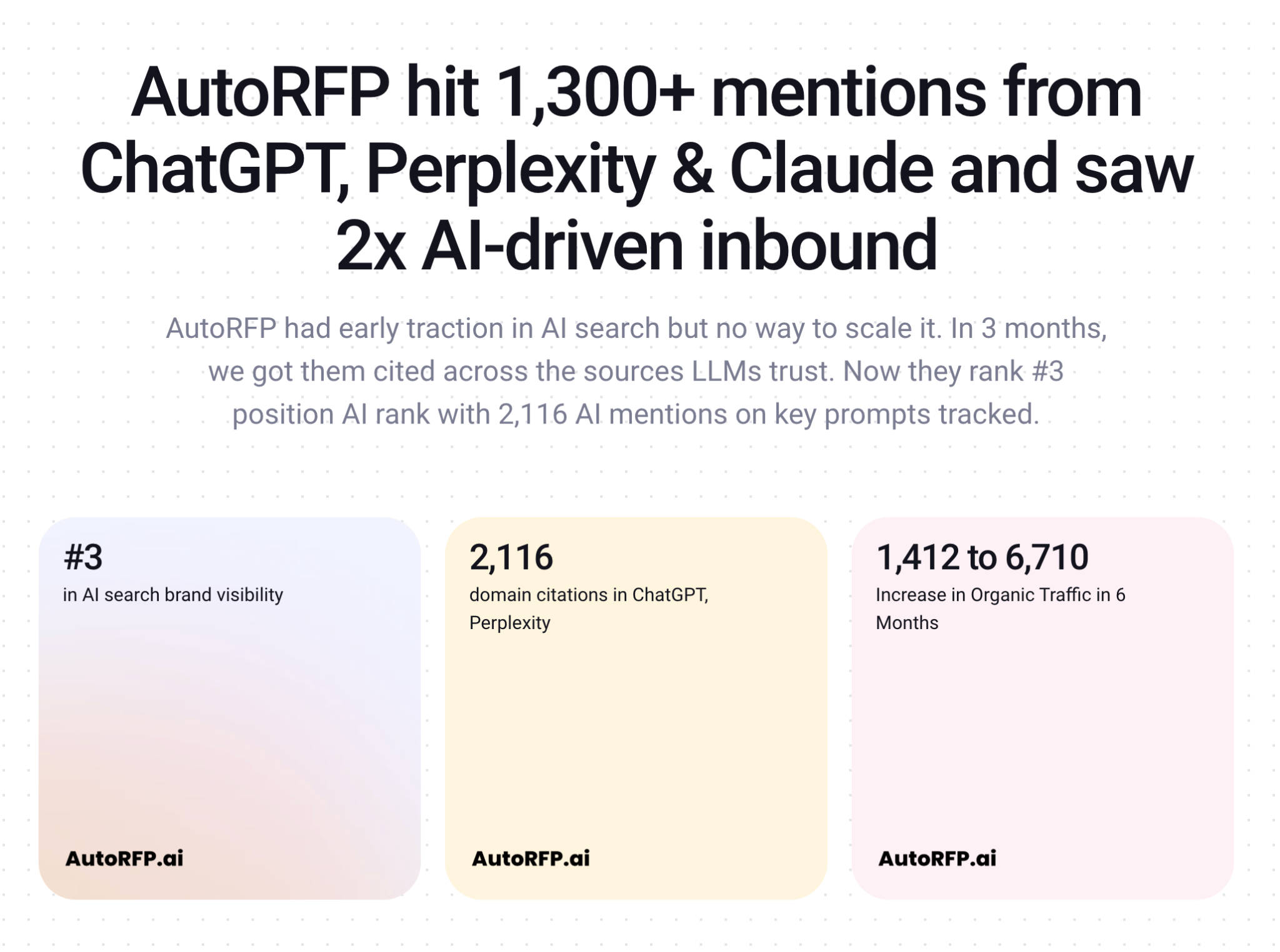
For our client, AutoRFP, this approach helped the brand become the #3 most visible in AI search, earn 2,116 citations across ChatGPT and Perplexity, and double AI-attributed inbound.
If your goal is dominating AI answer recommendations for your category, explore Scalerrs’ AEO/GEO services to get started. We work as an extension of your team, with dedicated Slack access and a 30-min response guarantee.
Hreflang: Get international traffic to the right version
If you serve buyers in multiple countries with different pricing, language, or content, hreflang tags tell Google which version to show to which audience. Common patterns:
- /us/pricing, /uk/pricing, /de/preise: Country-specific paths with matching hreflang annotations
- /en/, /de/, /fr/: Language subdirectories
- en-US, en-GB, de-DE: Codes matched consistently in the head or via XML sitemap
Metadata: Title tags and meta descriptions still matter
Every indexable page needs:
- One unique title tag (55-60 characters, primary keyword up front)
- One unique meta description (150-160 characters, written to earn the click, not stuff keywords)
- One <h1> matching the page's core intent
- Descriptive alt text on every meaningful image
Templates that generate the same title on 200 different pages are a silent ranking killer. Audit for duplicate titles quarterly in Search Console or at scale for enterprise SaaS SEO via a crawler like Screaming Frog, Sitebulb, Ahrefs, or Semrush.
SaaS Technical SEO Mistakes to Avoid
Reddit discussions in communities like r/TechSEO and r/bigseooften describe technical debt accumulating until rankings begin slipping or indexing problems suddenly appear. In our experience, you can trace it back to these common mistakes:
Mistake #1: Measuring Lighthouse Scores Instead of Business Impact
A Lighthouse score of 100 looks great. It doesn't necessarily produce more demos. Real-user metrics from the Chrome UX Report matter far more than chasing perfect synthetic benchmarks.
✅ The fix: Prioritize optimizing pricing pages, demo pages, comparison pages, and product pages as they’re the templates that influence revenue.
Mistake #2: Assuming Technical SEO Ends Once Google Can Crawl Your Website
That assumption made sense five years ago.
Technical SEO earns you the right to be found. But today, "found" means more than a Google ranking. Your buyers discover software through AI Overviews, ChatGPT, Perplexity, Reddit, YouTube, and industry publications. The technical foundation has to support all of those surfaces. And the signals that earn you the right to be the answer across all of them go well beyond crawlability.
✅ The fix: Alongside technical improvements, we increasingly recommend strengthening entity signals, just as this Reddit discussion shares:
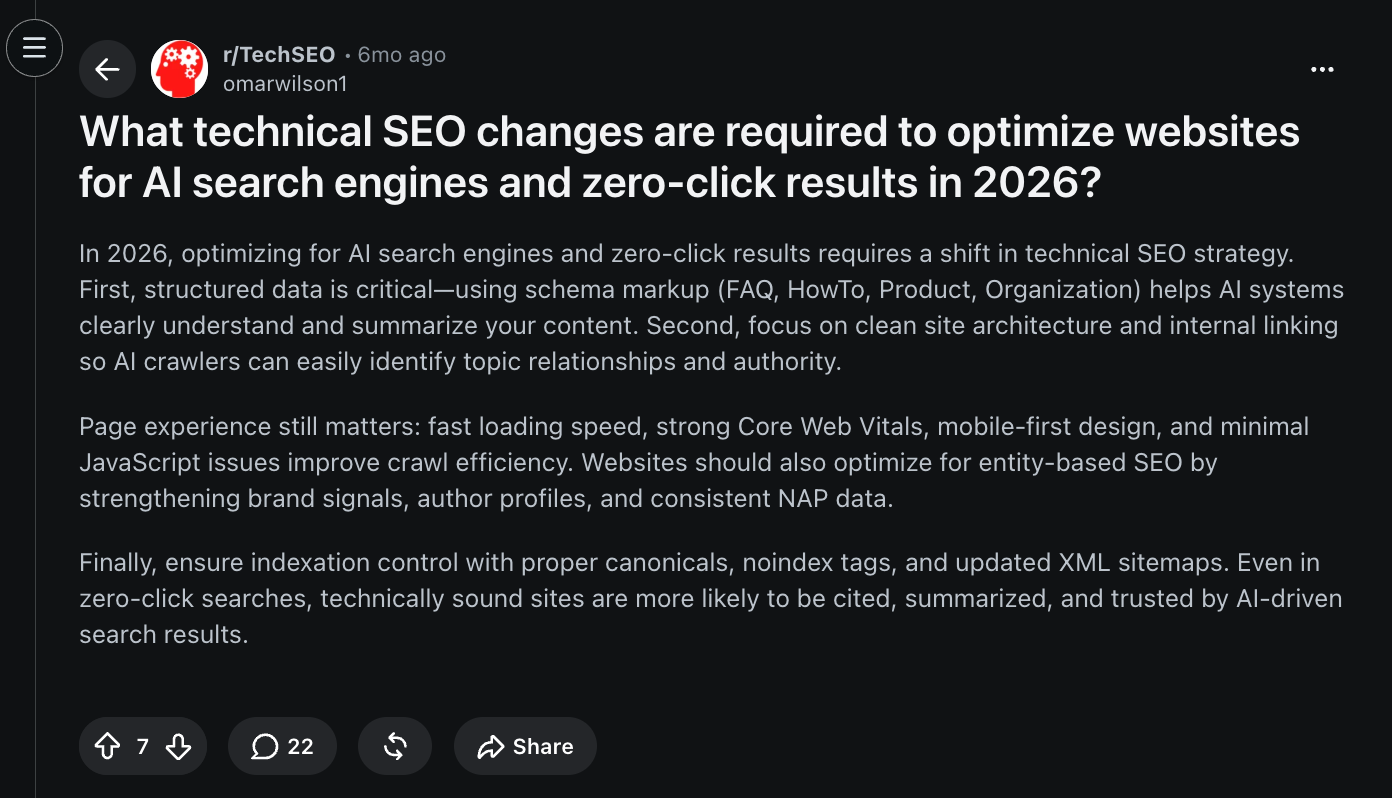
You can strengthen entity signals through multiple channels that reinforce how AI systems understand your brand—not just how they crawl your website.
If your CEO or RevOps lead is asking why your brand isn't showing up in ChatGPT, the answer often starts here:
- An entity-first content strategy: Build topical authority with expert-led SaaS content that consistently reinforces your expertise, products, and core entities across your site
- AI brand mentions: Earn placements in high-authority comparison pages and "best of" listicles that buyers trust and AI systems frequently reference
- Reddit marketing: Position your brand in the threads buyers trust, Google ranks, and AI references most through community-native, helpful participation, rather than promotional spam
- YouTube SEO: Create videos around buying-intent topics with optimized transcripts and metadata that fuel YouTube search, Google SERPs, and AI-generated answers simultaneously
- Wikipedia pages: Build compliant, well-sourced Wikipedia pages that becomes a trusted entity reference for search engines and AI models alike
Technical SEO gets you into the game. These signals determine where your brand shows up once buyers move beyond the search bar. Scalerrs combines traditional SEO, entity optimization, digital PR, Reddit, YouTube, and AEO into a single growth program designed to maximize your visibility across both search engines and AI answer engines.
Get in touch with our team to scope it out for your brand.
Mistake #3: Orphaning Your Bottom-of-Funnel Pages
The comparison page you built to rank for "[your competitor] alternatives" gets one internal link from a footer. Meanwhile, an educational blog post has 40 internal links pointing at it. Google concludes the educational blog post is your most important page, while it doesn't convert.
✅ The fix: Run an internal linking audit. For every bottom-of-funnel page you care about (alternatives, comparisons, pricing, top solutions pages), make sure at least 5-10 relevant blog posts and pillar pages link to it with descriptive anchor text.
Mistake #4: Cannibalization across feature, comparison, and alternatives pages
SaaS marketing teams love to ship pages. /features/proposals, /for-sales-teams/proposal-software, /solutions/proposals, /vs/pandadoc, /alternatives/docusign. Six months later you've got twelve pages all trying to rank for variants of the same query, none of them clearly winning.
Google picks one and buries the rest. Your team wonders why more pages aren’t winning you more traffic.
✅ The fix: Map every high-intent keyword to exactly one page. For each cannibalized cluster, pick the strongest version (highest traffic, most backlinks, best conversion path), 301-redirect the weaker ones into it, and consolidate the content. Update internal links to point at the new canonical page. Then hold the assembly line: every new page proposal needs to go through a keyword mapping check before it ships.
Which Tools Are Best for SaaS Technical SEO?
No single tool can audit every part of a SaaS website. We use different tools depending on whether we're investigating crawlability, rendering, performance, or competitive visibility. Together, these five cover the majority of issues.
1. Google Search Console
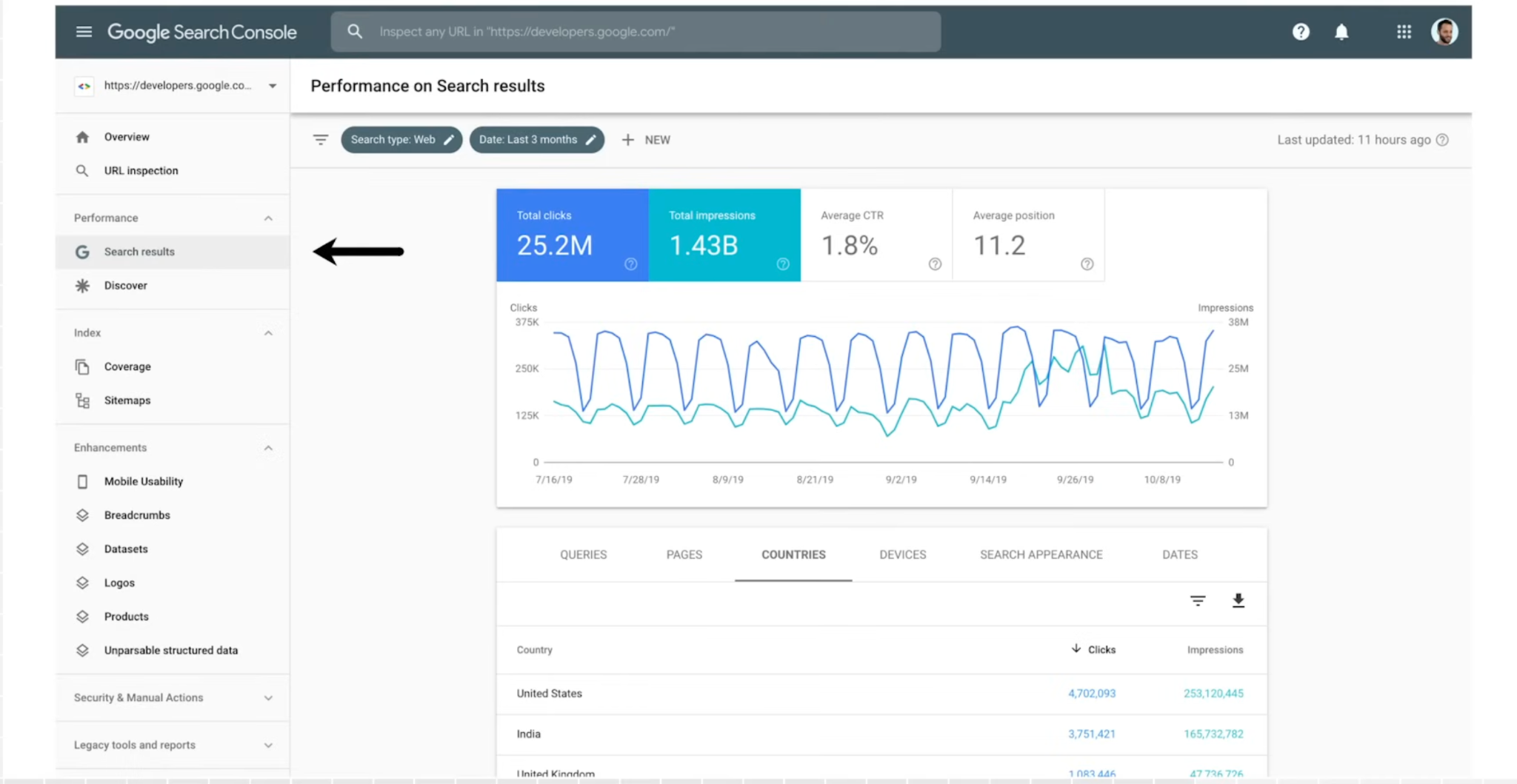
If you only use one technical SEO tool, make it Google Search Console. It's Google's direct line of communication with your website, showing how Google crawls, indexes, and ranks your pages.
For SaaS companies, Search Console is invaluable for identifying pages that aren't indexed, monitoring Core Web Vitals, diagnosing crawl issues, and spotting pages losing visibility over time. The URL Inspection tool also lets you see exactly how Google renders an individual page, making it particularly useful for JavaScript-heavy websites.
- Pros: Free, first-party Google data, no setup beyond verifying your domain
- Cons: No competitor data, limited to 1,000 rows in most reports, doesn't help you plan. Only shows what already happened
- Best for: Every SaaS marketing/growth team. This is the baseline.
2. Screaming Frog SEO Spider
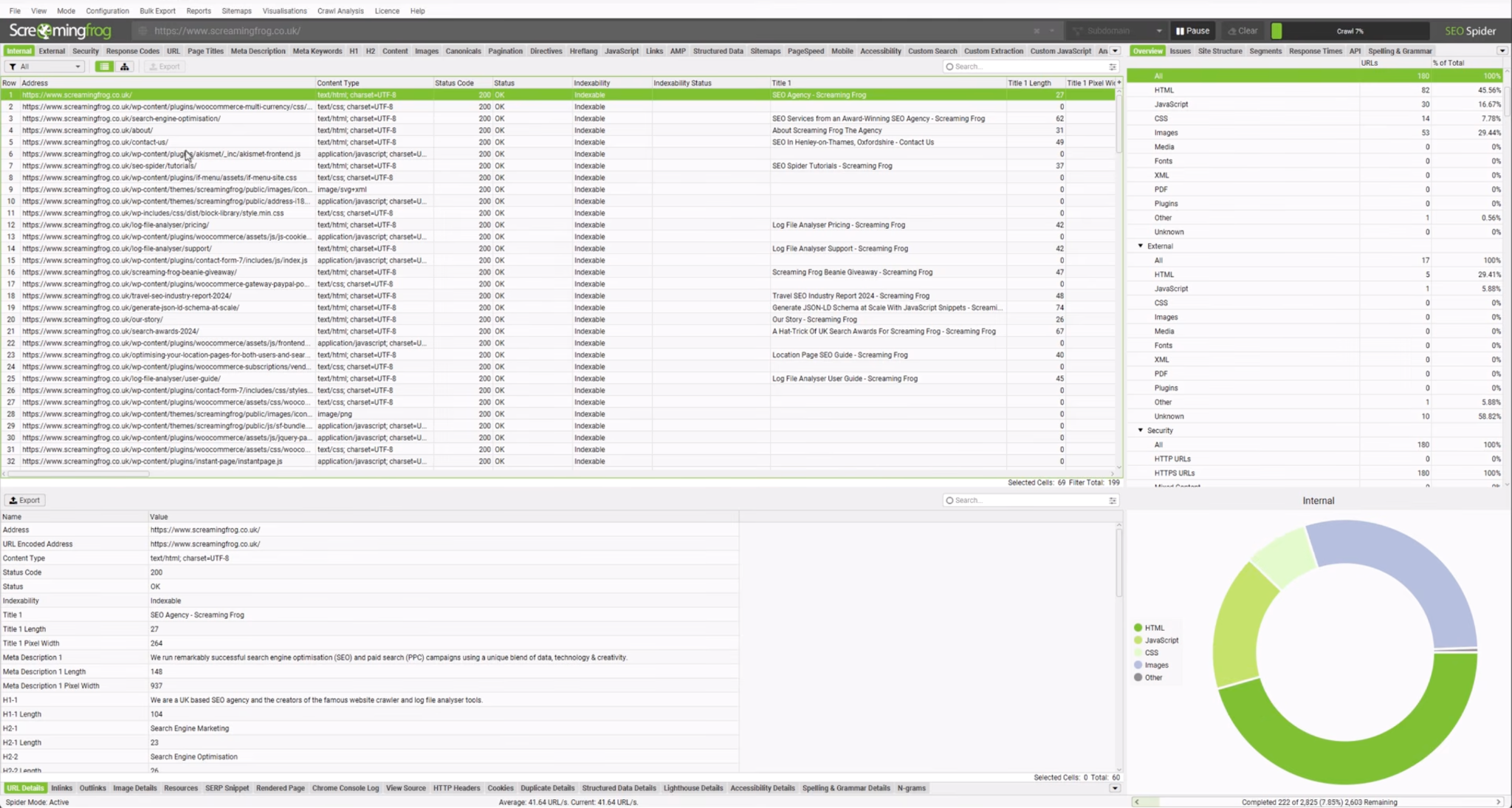
Screaming Frog remains the industry standard for technical SEO crawling because it shows your website the way a search engine sees it.
A single crawl quickly uncovers broken links, redirect chains, duplicate metadata, orphan pages, missing canonicals, and internal linking issues. It also integrates with Google Search Console, GA4, and PageSpeed Insights, allowing you to combine crawl data with real search performance.
- Pros: Affordable, deep technical data, JavaScript rendering, exports everything to CSV
- Cons: Steep learning curve, desktop-only (no cloud), interface feels dated
- Best for: SEO managers and technical SEOs. If you're doing hands-on audit work weekly, buy the licence.
3. Ahrefs
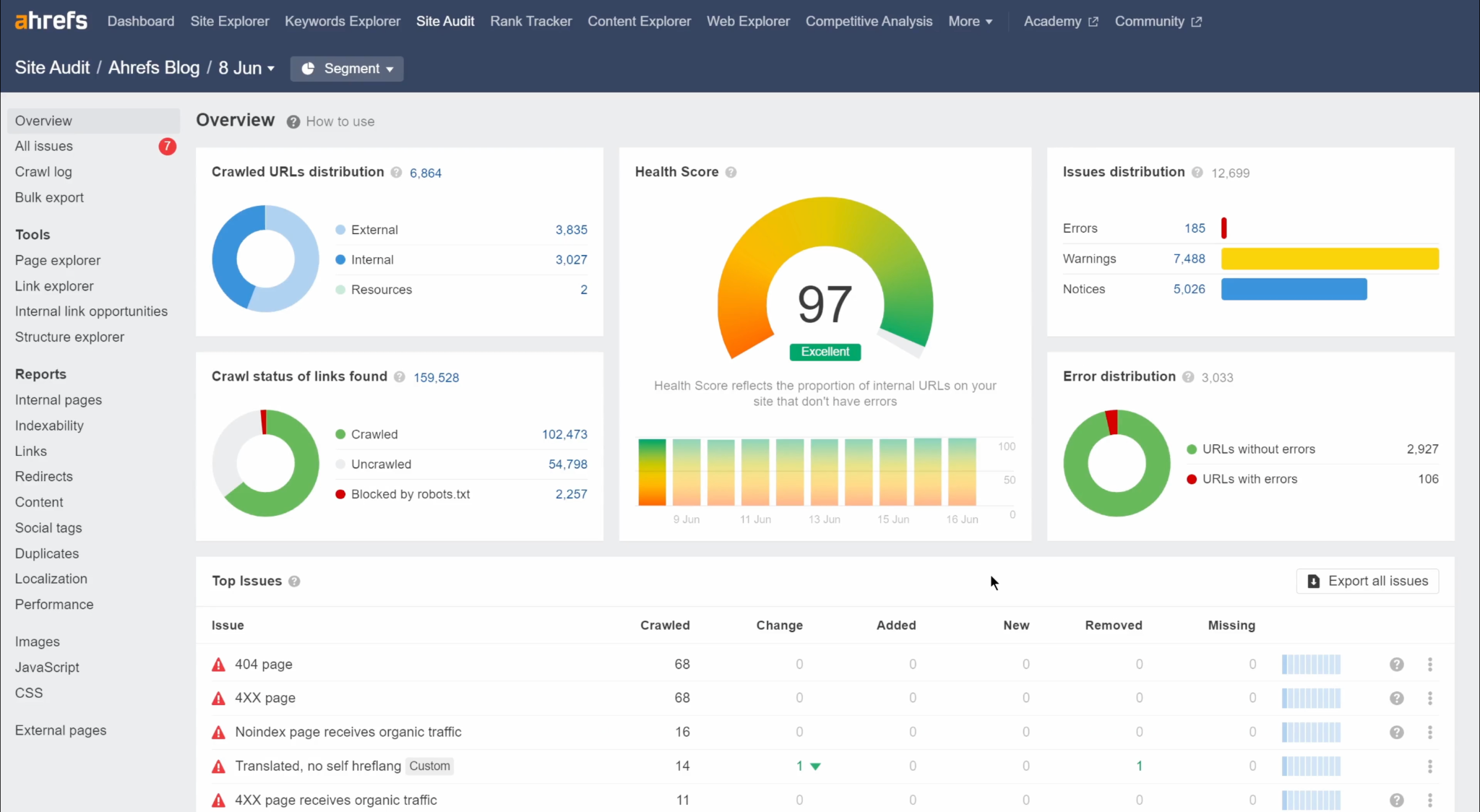
You might associate Ahrefs with keyword research, but it's equally valuable during a technical SEO audit.
Its Site Audit tool continuously monitors technical health, while Site Explorer helps you identify pages losing traffic, backlink opportunities, and competitor gaps. One particularly useful feature for SaaS teams is comparing competing content clusters to understand where your architecture or internal linking falls behind.
Ahrefs also recently introduced Brand Radar, making it one of the few SEO platforms beginning to monitor visibility across AI search experiences alongside traditional rankings.
- Pros: Largest backlink index in the industry, cleanest interface for competitive research, orphan pages report is best-in-class
- Cons: Expensive at scale, credit-based usage limits on lower tiers, not a substitute for a dedicated crawler like Screaming Frog on very large sites
- Best for: SaaS teams doing serious keyword and competitor research. Pair it with Screaming Frog or Sitebulb for the crawl-heavy work.
4. Sitebulb
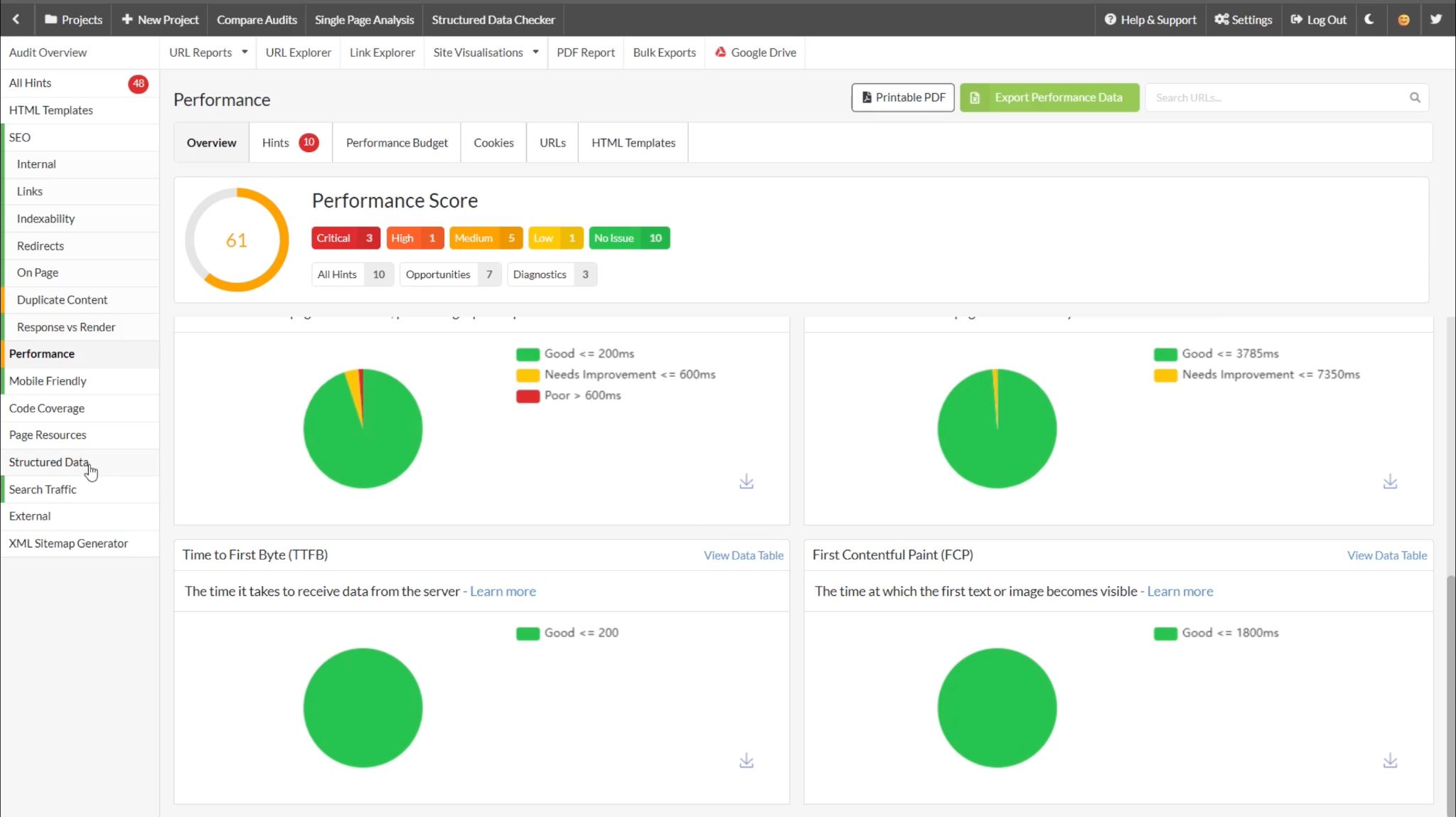
Sitebulb covers many of the same areas as Screaming Frog but presents technical issues visually, making it much easier to explain findings to marketing leaders and engineering teams.
Instead of overwhelming you with thousands of URLs, it prioritizes issues by severity and visualizes crawl depth, internal linking, redirect paths, and architecture. This makes it especially useful for large SaaS websites where understanding the overall structure is often more important than fixing isolated errors.
We've found Sitebulb particularly helpful during technical audits before major website migrations.
- Pros: Prioritized issue reports with fix explanations, strong visualizations, includes JavaScript rendering at no extra cost
- Cons: Smaller user community than Screaming Frog (fewer tutorials, fewer forum threads), more expensive at the higher tiers
- Best for: Agencies and in-house teams that need to present technical findings to non-technical stakeholders
5. PageSpeed Insights
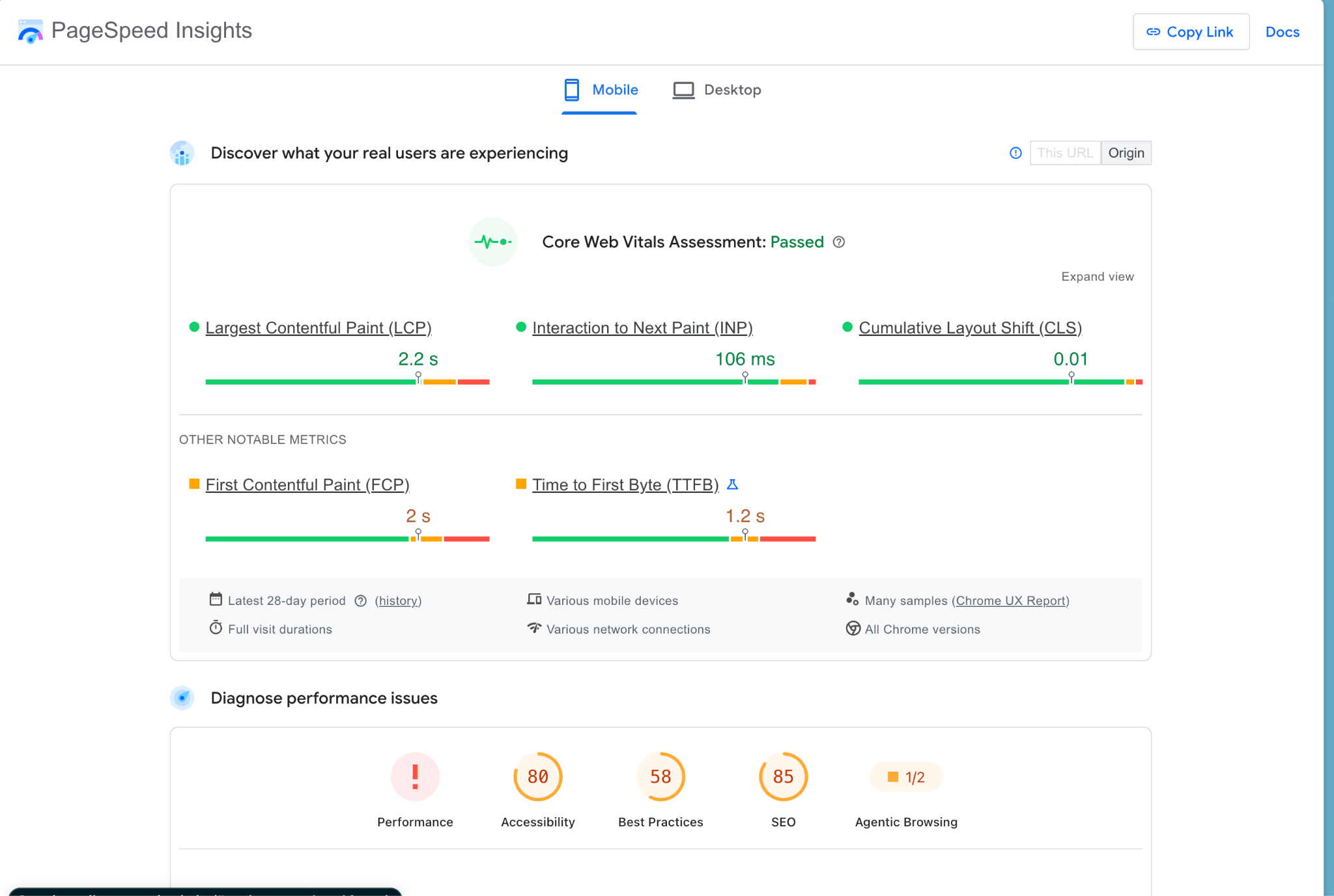
Technical SEO isn't complete without measuring how quickly users can actually access your pages.
PageSpeed Insights combines lab data with real-world Chrome User Experience Report (CrUX) data to evaluate Core Web Vitals, identify performance bottlenecks, and recommend improvements. Unlike synthetic testing tools, it also shows how real visitors experience your pages across different devices and network conditions.
- Pros: Free, real-user data via CrUX, specific and actionable recommendations, no setup
- Cons: Only tests one URL at a time (for site-wide monitoring, use Search Console's Core Web Vitals report), CrUX data requires enough Chrome traffic to populate, doesn't tell you how to fix (just what’s broken)
- Best for: Diagnosing individual page performance. Every marketer and dev on your team should have this bookmarked.
The stack we recommend:
- Early stage: Google Search Console + PageSpeed Insights + free Screaming Frog. That covers 80% of what you need for the first year.
- Series A-B, 500+ pages indexed: Add Ahrefs Standard and paid Screaming Frog. Sitebulb becomes worth it once you need to present findings to leadership regularly.
- Scale (Series C+, 5,000+ pages): All five, plus a log file analysis tool (Screaming Frog Log Analyzer, JetOctopus, or Botify) to see what Googlebot is actually doing on your site.
SaaS Technical SEO Case Studies/Success Stories
Technical SEO doesn't generate pipeline on its own. It creates the foundation that allows your content, product pages, and authority to perform as intended.
These examples show what happened for our clients when we prioritized technical improvements alongside the broader SEO strategy.
Korona POS: Rebuilding the technical foundation after Google updates
The problem: Korona POS had built strong organic visibility over several years before multiple Google updates caused rankings and leads to decline. Their website had expanded considerably, with commercial pages competing against informational content and technical inconsistencies making it harder for search engines to understand which pages mattered most.
What the audit found: The technical audit uncovered an inconsistent site architecture, overlapping commercial pages, weak internal linking between revenue-driving assets, and opportunities to improve crawl efficiency. Existing content wasn't clearly mapped to buyer intent, making it difficult for Google to establish topical authority around key POS categories.
What we did: We reorganized the site's commercial architecture, consolidated overlapping pages, strengthened internal linking, optimized technical foundations for high-intent pages, and rebuilt topical clusters around priority commercial keywords. Alongside traditional SEO improvements, we also optimized the site for AI retrieval and strengthened authority through backlinks and supporting content.
Results: Organic traffic increased 166%, monthly SQLs grew 136%, Korona achieved #1 rankings for multiple competitive POS keywords, and earned citations in Google AI Overviews alongside Square, Shopify, and Lightspeed. The company also reached #2 AI visibility in its category with more than 4,000 LLM mentions.
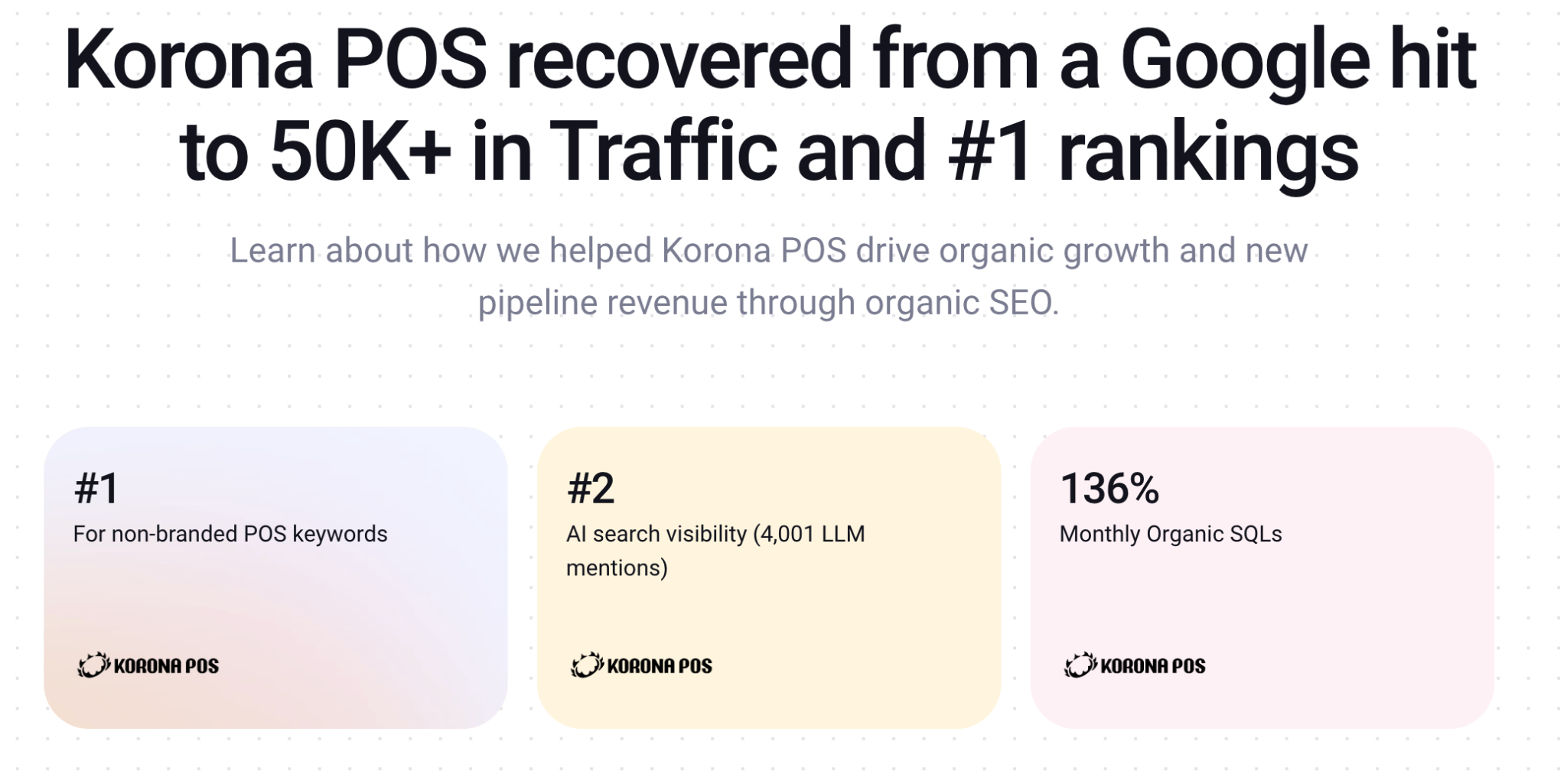
Takeaway: Technical improvements work best when they reinforce commercial intent. Better architecture, stronger internal linking, and cleaner crawl paths helped Google prioritize the pages that actually generated the pipeline.
TuxCare: Fixing technical debt across a 3,000-page content library
The problem: TuxCare had worked with seven SEO agencies over three years and built a blog library of 3,000+ posts. Despite the volume, organic growth was stagnant. In an enterprise Linux security category dominated by giants like Red Hat, Canonical, and Oracle, publishing more content wasn't the answer. Something structural was broken.
What the audit found: The audit uncovered severe keyword cannibalization across hundreds of posts, thin and overlapping content targeting the same queries with different angles, and hundreds of low-value pages consuming crawl budget while the pages that mattered got recrawled slowly. Internal linking was scattered, and there was no clear pattern signalling to Google (or AI models) which pages were authoritative on which topics.
What we did: We consolidated duplicates, removed obsolete content via 301 redirects and noindex where appropriate, and rebuilt internal linking around topic clusters that reinforced TuxCare's core categories. The technical rebuild came first. Content production came second. We also formatted key pages for AI citation with clean answers up top, named stats, and structured sections, so LLMs could pull TuxCare into comparison answers against the incumbents.
Results: Organic traffic grew 40% before we published a single new post. TuxCare's blogs began outranking Red Hat, Canonical, and Oracle in AI search across their most important category queries.
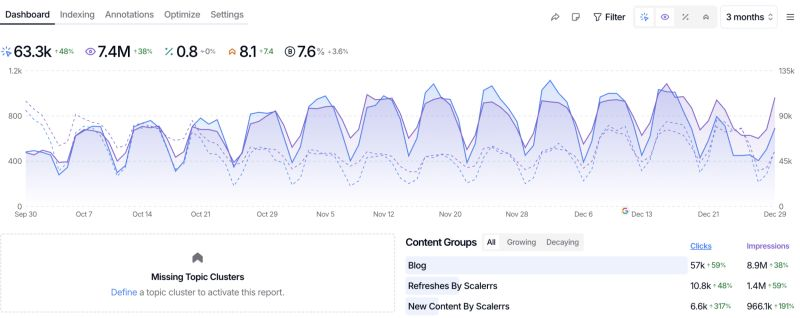
Takeaway: Publishing volume can't outrun a broken technical foundation. Consolidating what already exists often unlocks more growth than adding to it.
Technical SEO isn't the end goal. It's the foundation that allows every other SEO investment to perform better. If you want to uncover the technical issues limiting rankings, demos, and pipeline, explore more of our case studies.
And, if you want a SaaS specialist SEO partner who owns the technical foundation end-to-end, book a call with our team. With weekly updates and monthly performance reports, we make it easy for you to report progress upward. We also surface wins ad-hoc, so you know what’s working well.
SaaS Technical SEO Checklist
The checklist below covers the core areas we review during every technical SaaS SEO audit. If your answers are mostly "No," it's a good indication your technical foundation deserves attention before investing further in content or link building.
Start with the table for the executive summary, then work through the detailed list below.
Full checklist by pillar
Crawlability, indexation, and log file analysis
- XML sitemap contains only URLs you want indexed (no filter URLs, no old changelogs, no tag archives)
- Sitemap submitted to Google Search Console and Bing Webmaster Tools
- robots.txt allows Googlebot, Bingbot, GPTBot, ClaudeBot, PerplexityBot, Google-Extended, and CCBot on marketing pages
- robots.txt blocks authenticated app routes and internal admin paths
- Google Search Console Page Indexing report reviewed for "Not indexed" URLs
- Every money page returns HTTP 200 and is indexed
- No accidental noindex tags on templates or key pages
- Soft 404s eliminated (SPA routes return real 404 status codes)
- Log file analysis run at least quarterly to see where Googlebot spends its time
- Index bloat identified (filter URLs, parameter combos, tag archives) and cleaned via noindex, follow or canonicals
Site architecture and internal linking
- Money pages (product, pricing, comparisons, alternatives) within 3 clicks of homepage
- Hub-and-spoke structure: category hubs one click from homepage, product/comparison/alternatives pages hang off relevant hubs
- Zero orphaned commercial pages (every important page has 2+ internal links pointing at it)
- Internal links flow from high-authority blog posts to commercial pages
- Descriptive anchor text used consistently (5 words or fewer, matches target page intent)
- Topic clusters interlink and link to commercial pages within the natural content flow
- Redirect chains cleaned up (max 1 hop, ideally direct 301)
- Internal links pointing to 404s or 301s updated to point directly at destination
JavaScript rendering and Core Web Vitals
- SSR (server-side rendering) or SSG (static site generation) implemented on every indexable page
- Content visible in raw HTML when JavaScript is disabled in browser
- All internal links use standard <a href> tags, not JavaScript onClick handlers
- Real HTTP 404 status codes returned for missing SPA routes
- Schema markup injected server-side, not via client-side JavaScript
- LCP under 2.5 seconds on money pages (measured via Google Search Console CWV report)
- INP under 200 milliseconds on money pages
- CLS under 0.1 on money pages
- Third-party scripts (chat, analytics, pixels) deferred or loaded after interaction
- Hero images compressed and served as WebP or AVIF
- width and height attributes set on all images and embeds to prevent layout shift
On-page technical foundations
- Self-referencing canonical tag on every indexable page
- Parameter URLs canonical back to the clean version
- SoftwareApplication (or WebApplication) schema on product and feature pages
- Organization schema on homepage with sameAs links to Wikidata, Crunchbase, and social profiles
- FAQPage schema on genuine FAQ sections only (never on pages without visible FAQs)
- BreadcrumbList schema on site-wide breadcrumbs
- Article schema on blog posts
- Every page has one unique title tag (55-60 characters, primary keyword up front)
- Every page has one unique meta description (150-160 characters)
- One < h1 > per page matching core intent
- Descriptive alt text on every meaningful image
- Hreflang correctly implemented and self-referencing for multi-region sites
FAQs
1. What is SaaS technical SEO?
SaaS technical SEO is the process of improving your website's crawlability, indexability, site architecture, rendering, performance, and technical health so search engines and AI systems can efficiently discover and understand your content. Unlike traditional websites, SaaS platforms also need to account for product pages, documentation, integrations, and frequent product updates.
2. How often should you perform a SaaS technical SEO audit?
It depends. Most growing SaaS companies benefit from quarterly technical audits, while enterprise websites should continuously monitor technical health and perform deeper reviews after major product launches, migrations, or website redesigns.
3. Can technical SEO improve SaaS conversions and demo sign-ups?
Yes. Technical SEO improves more than rankings. Faster pages, cleaner site architecture, better internal linking, and stronger indexing help visitors reach your product pages more easily, while improving user experience on pricing, comparison, and demo pages. Google's own guidance also recognizes page experience as part of the overall search experience.
4. Should technical SEO be a priority over content?
Usually, yes—at the beginning. Publishing hundreds of new pages won't help if search engines can't efficiently crawl, render, or understand your website. We typically recommend fixing technical issues that affect commercial pages first, then scaling content and authority-building efforts. Once the technical foundation is healthy, investments in content, backlinks, Reddit, YouTube, and AI visibility tend to compound much faster.
Turn Technical SEO into Revenue With Scalerrs
A technically healthy website is the starting point, not the finish line. Once search engines and AI systems can reliably crawl and understand your site, you can build visibility across Google, ChatGPT, Reddit, YouTube, and the other places your buyers research software.
That's the system we build at Scalerrs.
Book a free strategy call and, together, we'll review your technical foundation, AI search readiness, and the opportunities with the biggest potential business impact.
Book a Discovery Call
Turn Organic Search Into Your #1 SaaS Acquisition Channel.

Let us scale your SEO channel for you.
reviewed onClutch
4.9 rating










Get Free Resources In Your Inbox
Get all of our FUTURE playbooks such as Figma files, checklists and SOPs directly into your inbox.

.avif)